✨ What's New in v1.6
A full messaging inbox, a sales analysis tool, smarter offer controls, and tighter management of blocked sellers and billing.
New Features
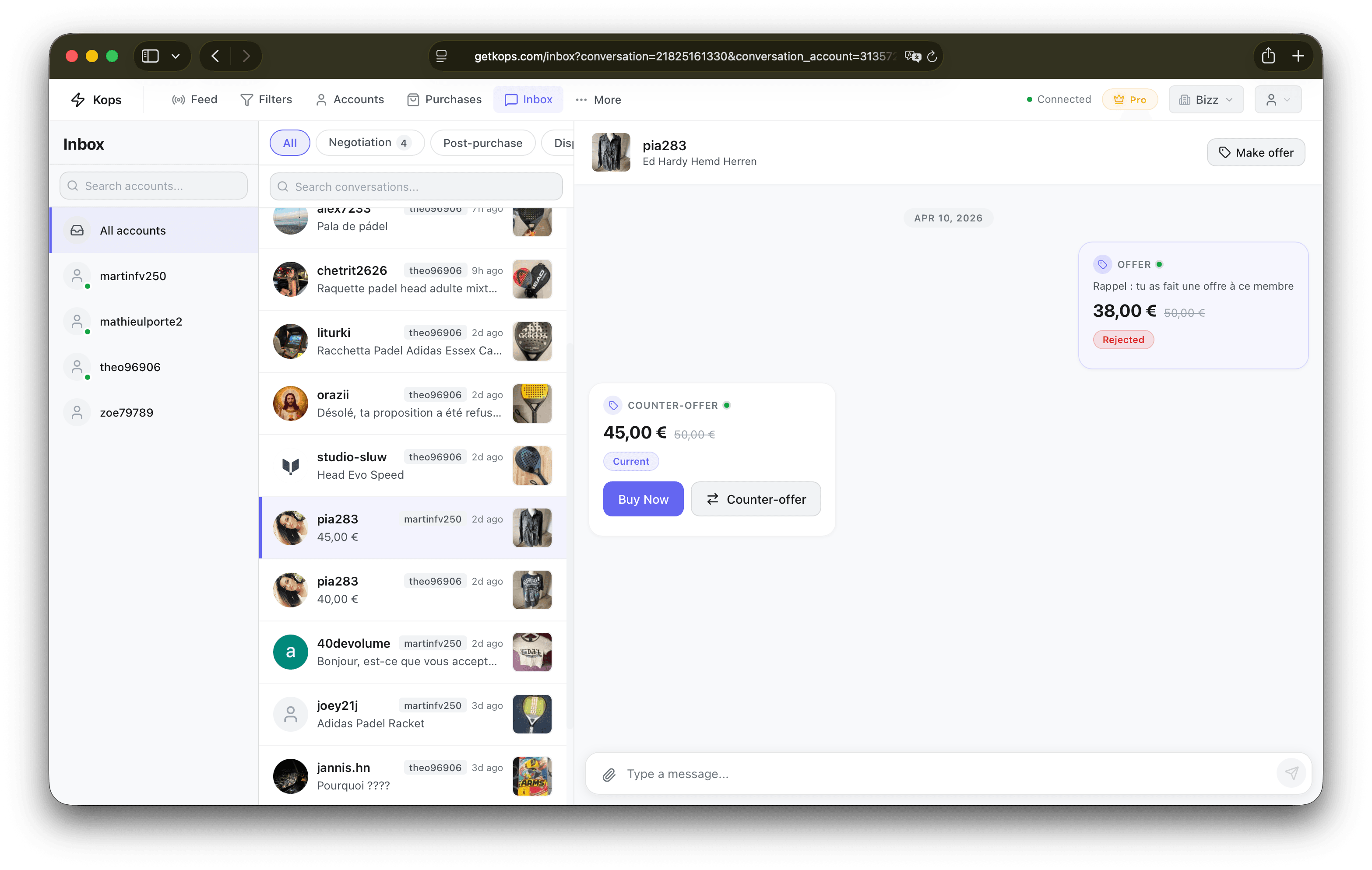
message Inbox — Your Vinted Conversations, Inside Kops
Your Vinted conversations are now accessible directly in the dashboard. The new Inbox shows all your active threads across all your accounts — with real-time updates as new messages arrive.
From any conversation you can:
- Read and reply to messages
- Make counter-offers, with a price gauge that shows your offer as a percentage of the current negotiated price and enforces a 40% floor
- See offer status updates in real time — Pending, Accepted, Rejected, or Cancelled — using your own language rather than raw server labels
- View live item status (sold, hidden) before responding
- Buy directly after an accepted offer — the purchase is locked to the account that negotiated the deal, so the rotator can't pick a different account and break the checkout
When 3DS bank authentication is required on a purchase, a Verify link appears inline so you never miss the step.
Find the Inbox in the main navigation.
📊 Sales Extractor
A new tool in the Toolbox: paste any Vinted seller URL or user ID and get a structured breakdown of their confirmed sales — product details, categories, price ranges, and niche clusters (brand/category groupings). Results are filterable and sortable by date, price, brand, or catalog.
Purchasing Improvements
blocked Blocked Sellers — Completely Silenced
Push notifications are now fully suppressed for blocked sellers, regardless of your blocking mode (Hide, Show — No Autocop, or Show with indicator). This was a gap: sellers set to "Show" modes could still trigger push alerts. That's fixed.
Autocop protection in the pre-order queue is also now complete: if you block a seller after a product is already queued, Kops immediately removes their items from the queue — no stale entries survive a restart either.
Subscription Management
refresh Switch Billing Interval, and Undo It
You can now switch between monthly and annual billing on your current plan — not just change plan tiers. Monthly → annual takes effect immediately (it's an upgrade). Annual → monthly is scheduled for your next renewal date, shown with a → Monthly badge on your subscription card.
If you change your mind, a "Cancel Scheduled Switch" button appears as long as the switch hasn't taken effect yet — no need to contact support.
Filter Improvements
🔗 Keyword Preserved on URL Import
When importing a filter from a Vinted URL, the keyword field is now correctly extracted and applied. Previously it was silently dropped, so any filter built around a specific search term would import without it. The keyword is also used as a fallback for the auto-generated filter name.
UI & UX Polish
🃏 Adaptive Product Cards
Product cards now adapt their layout based on the container's available width, not just the screen size. Cards in medium-width panels (600–720px) switch to a compact grid before the shared mobile breakpoint, keeping columns legible in narrower views.
Thank you for the continued feedback — there's plenty more ahead. 🚀