États des comptes
Actif, quarantaine, inactif, sur-capacité — ce qui met un compte dans chacun, combien de temps dure la quarantaine, et les quatre conditions exactes qui décident si l'autocop l'utilisera.
Les onglets de statut et les pastilles de /accounts.
Les trois états
| État | Point | Signification | Retour |
|---|---|---|---|
| Actif | active vert | Authentifié, utilisable pour acheter | — |
| Quarantaine | quarantined orange | Mis de côté temporairement après un signal de protection Vinted | check Automatique |
| Inactif | inactive gris | Session morte, compte banni, ou éteint | cross Action requise |
La colonne Statut peut dire une quatrième chose, et ce n'est pas un état du compte — voir Sur-capacité en bas de cette page.
Quarantaine
Kops sort un compte de la rotation quand Vinted répond par un signal de protection. Si le réglage facultatif de quarantaine liée à l'utilisation est activé, atteindre un seuil de tentatives le met aussi en pause. Le compte n'est pas cassé ; on le met au repos.
| Signal | Temps de repos |
|---|---|
| Limite de débit — trop de requêtes | 1 heure |
| Blocage anti-bot | 2 heures |
| Détection de fraude | Votre durée de quarantaine anti-fraude — 24 heures sauf si vous choisissez moins |
| Bloqué à la commande — Vinted refuse le compte avant tout paiement | Votre durée de quarantaine anti-fraude — 24 heures sauf si vous choisissez moins |
La durée est décidée par le signal reçu, jamais par le nombre de fois où c'est arrivé. Le compteur décide si la quarantaine tombe ; le signal décide combien de temps. Ce qui compte, et combien il en faut, juste en dessous, est l'autre moitié.
Les deux derniers sont des blocages anti-fraude temporaires de Vinted, qu'il lève au bout d'un temps variable. Combien de temps Kops met le compte au repos pour eux, c'est vous qui le choisissez : Durée de quarantaine anti-fraude, dans Sécurité, sous Paramètres → Préférences d'achat — 1, 4, 8, 16 ou 24 heures. Elle n'apparaît que lorsque la quarantaine automatique est activée, puisque sans elle il n'y a aucun repos à dimensionner.
Le compte revient tout seul à la fin du repos — la colonne Statut fait le décompte. Pendant ce temps, il est retiré de la rotation et ne ralentit pas vos autres comptes.
Vous pouvez avancer la fin d'une quarantaine déclenchée par une erreur avec Libérer, dans le détail du compte. Une pause pour limite d'utilisation se termine quand les compteurs glissants repassent sous leurs seuils configurés ; elle ne peut pas être levée manuellement. Vous pouvez la remplacer par une pause manuelle pour garder le compte hors de la rotation.
Ce qui compte, et combien il en faut
Sept erreurs mettent un compte en quarantaine à cause d'une erreur. La limite de tentatives peut entraîner une pause automatique distincte, désactivée par défaut. Toutes les autres erreurs du catalogue — il y en a plus d'une centaine — le laissent dans la rotation.
Trois des quatre signaux tombent sur la première erreur qui les porte. La détection de fraude est l'exception : il lui en faut trois d'affilée.
| Signal | Les erreurs qui le portent | Tentatives nécessaires |
|---|---|---|
| Limite de débit | Limite de débit atteinte | 1 |
| Blocage anti-bot | Blocage anti-bot, Captcha requis, Échec du captcha | 1 |
| Détection de fraude | Paiement bloqué, Paiement refusé (« Vinted a refusé le paiement sans en donner la raison ») | 3 d'affilée |
| Bloqué à la commande | Bloqué à la commande | 1 |
warning Deux erreurs différentes s'appellent Paiement refusé en français, et une seule des deux met un compte en quarantaine. C'est la phrase en dessous du titre qui les sépare :
- « Vinted a refusé le paiement sans en donner la raison » — celle-ci compte. Trois d'affilée, et le compte est au repos pour votre durée de quarantaine anti-fraude.
- « Le paiement a été refusé par votre banque » — celle-ci ne compte pas, ni maintenant ni jamais. La réponse est une autre carte, pas un autre compte.
En anglais l'interface les distingue toute seule : Payment Rejected et Payment Declined.
Les deux erreurs de détection de fraude partagent un seul compteur. Elles ne sont pas comptées séparément : deux Paiement refusé et un Paiement bloqué, dans n'importe quel ordre, font trois.
Rien d'autre ne le fait avancer. Ni le Paiement refusé de la banque, ni 3D Secure non confirmé, ni Déjà vendu, ni Article non achetable — Vinted qui refuse l'annonce, pas le compte —, ni quoi que ce soit arrivé sur un autre compte — le compteur est par compte. Un compte peut en accumuler cent sans jamais être mis en quarantaine pour autant.
« D'affilée » enjambe les échecs qui ne comptent pas. Une course perdue entre deux Paiement refusé n'ajoute rien au compteur et ne le remet pas à zéro ; le second reste le second. La seule chose qui le remet à zéro, c'est un achat réussi sur ce compte, qui efface d'un coup tous ses compteurs.
Le compteur n'est affiché nulle part sur le compte — c'est la colonne Erreur des Tentatives qui permet de le voir venir. Deux Paiement refusé sur un même compte depuis son dernier achat réussi, et le prochain le met au repos pour votre durée de quarantaine anti-fraude.
Une relance est une tentative. Acheter à la main compte exactement comme un achat automatique : mêmes sept erreurs, même compteur, sauf si vous l'avez désactivé dans Modes d'exécution. Relancer deux fois sur un compte qui porte déjà deux Paiement refusé est la façon la plus courante de mettre son propre compte en quarantaine.
Mettre un compte en quarantaine soi-même
Quarantaine, dans le détail du compte, met un compte en pause volontairement.
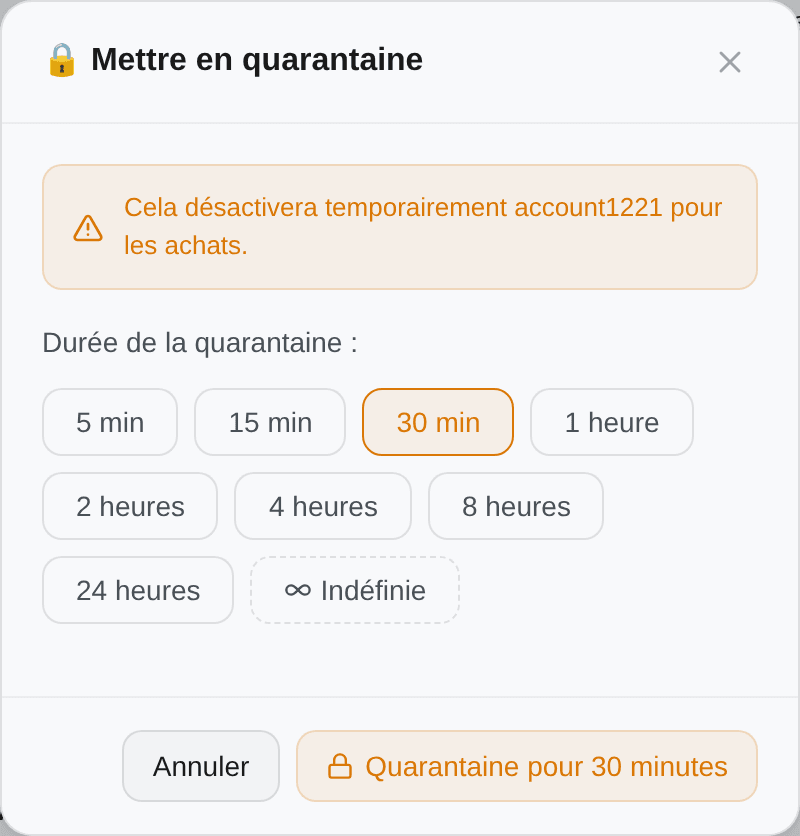
Choisissez une durée — 5 min, 15, 30, 1 heure, 2, 4, 8, 24, ou Indéfinie. Utile quand vous soupçonnez un problème sur un compte et voulez l'écarter sans le supprimer.
Une quarantaine indéfinie ne se lève jamais toute seule. C'est celle qui sera encore là dans un mois, sur un compte dont vous avez oublié la mise en pause. Le menu groupé propose la même liste à partir de 30 minutes, sans les deux courtes.
Gardez la quarantaine automatique activée. Sans elle, un compte dont la carte se fait bloquer pour fraude repart sur chaque correspondance, empile des tentatives qui ne pouvaient pas aboutir — et fait paraître votre taux de réussite bien pire qu'il n'est. Si une carte se fait bloquer, changez la carte ; ne coupez pas le mécanisme qui protège le compte.
Inactif, et pourquoi
Inactif porte toujours une raison précise, lisible dans le détail du compte avec la date.
| Raison | Ce que ça veut dire | Quoi faire |
|---|---|---|
| Session expirée | Les jetons ne sont plus valides | Reconnecter |
| Authentification échouée à répétition | Vinted a refusé les requêtes de ce compte de façon répétée | Reconnecter |
| Compte banni | Vinted a suspendu le compte | cross Rien. Le compte est perdu, et Kops ne propose pas Reconnecter |
| Abonnement expiré | Votre formule Kops n'est pas active | Réactivez la formule |
| Désactivé manuellement | Vous l'avez mis en pause vous-même | Reconnectez quand vous le voulez |
| Ce compte est inactif | Aucune raison n'a été remontée | Reconnecter |
Deux d'entre elles méritent une phrase de plus.
Kops ne désactive pas sur un seul refus. Authentification échouée à répétition demande trois confirmations consécutives que la session est morte, et le signal compté est déjà prudent — Vinted l'a dit, ou a refusé pendant des heures sans le dire. Un incident réseau ne vous coûte pas un compte.
Un bannissement est trouvé sans attendre un achat. Actualiser un compte lit le drapeau de suspension de Vinted lui-même : un compte banni est marqué en un cycle d'actualisation, plutôt qu'à sa prochaine tentative.
La cause la plus fréquente de loin reste un compte ajouté avec un access token et aucun refresh token — voir Ajouter un compte.
Ce qui rend un compte utilisable
La colonne État porte une pastille par élément dont le compte a besoin, et une pastille en pointillés avec un + pour ce qui manque — cliquez dessus pour l'ajouter sans quitter le tableau.
| Pastille | Signifie |
|---|---|
| 💳 Marque + quatre derniers | Une carte est enregistrée. Survolez pour le numéro masqué complet |
| 📍 Une ville | Une adresse est enregistrée. Survolez pour la ligne complète |
En pointillés, avec + | Manquant. Cliquez pour l'ajouter |
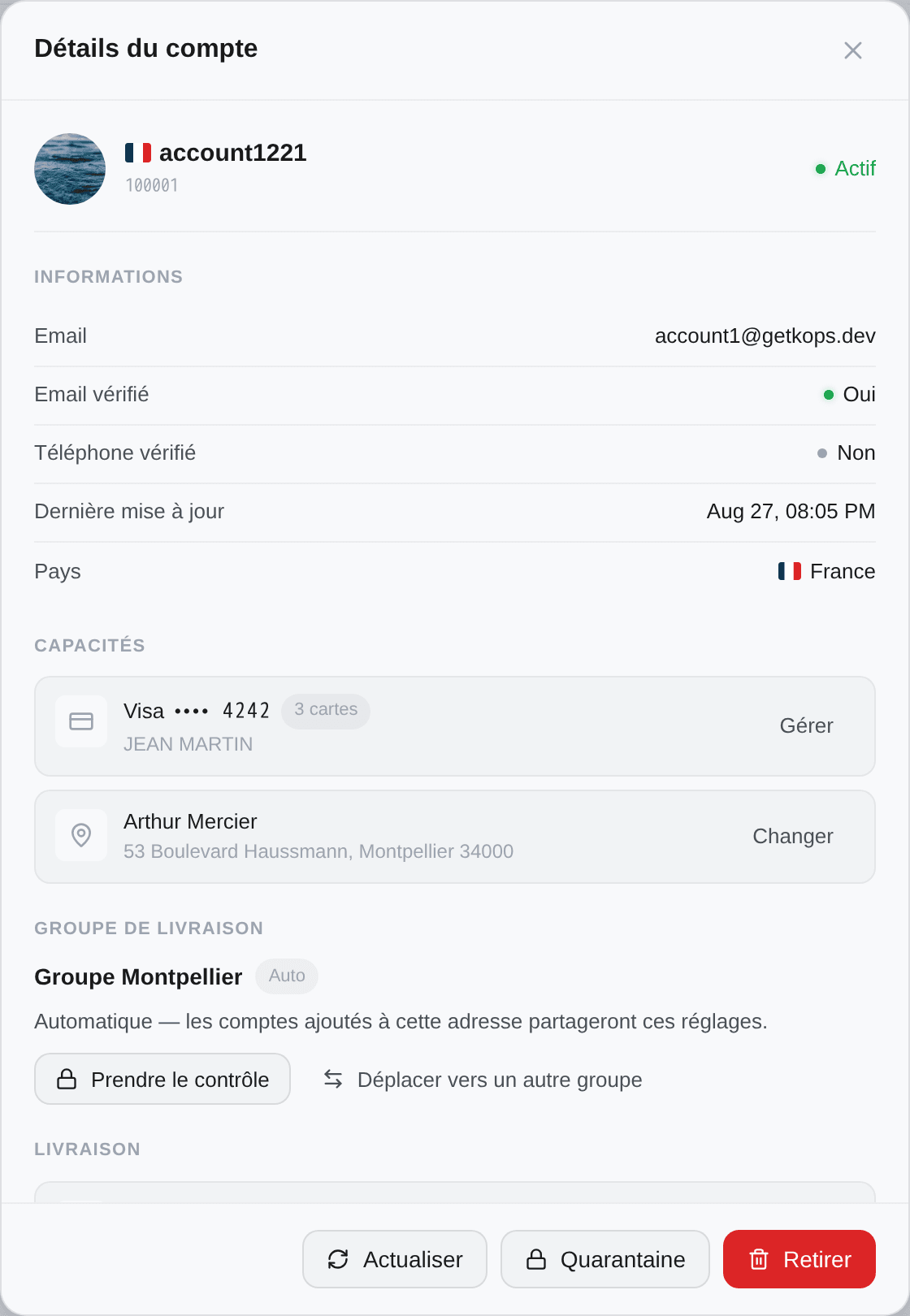
L'autocop n'utilise un compte que si ces quatre points sont vrais, et ils sont revérifiés à chaque correspondance :
- Le compte est Actif — ni en quarantaine, ni inactif
- Une carte est enregistrée
- Une adresse est enregistrée
- Cette adresse a été située sur la carte
Le quatrième est celui que personne ne devine. Une adresse, c'est du texte ; choisir un point relais demande des coordonnées, et Kops géocode l'adresse pour les obtenir. Ça marche presque toujours du premier coup — mais une adresse qu'il n'a pas su placer laisse le compte avec une pastille d'adresse verte et aucune coordonnée, et le compte est écarté exactement comme s'il n'avait pas d'adresse du tout.
La solution, c'est Actualiser. Actualiser un compte relit son adresse depuis Vinted et relance le géocodage. Si un compte semble parfaitement configuré et n'apparaît jamais dans vos tentatives, actualisez-le avant de chercher ailleurs.
Tout le reste de ce que vous voyez sur le compte — email vérifié, téléphone vérifié, bon score de vitesse — est une information, pas une condition. La vérification de l'email ne fait pas partie de la règle, et un compte écarté pour l'un des quatre points est écarté en silence : rien n'apparaît dans vos tentatives, ce qui explique exactement pourquoi ça ressemble à un mystère.
Si l'autocop ignore encore un compte après ces quatre points, vérifiez la cinquième chose, qui n'est pas sur le compte : si vous utilisez les groupes, le dossier contenant le filtre qui a matché doit être lié à un groupe qui contient ce compte.
Actions sur un compte
Cliquez n'importe quelle ligne pour ouvrir le compte. Depuis le pied de la fenêtre :
| Bouton | Effet |
|---|---|
| Actualiser | Relit le compte depuis Vinted — pseudo, avatar, pays, vérifications, cartes, adresse, et les coordonnées de l'adresse. Absent quand le compte est inactif |
| Quarantaine | Le met en pause volontairement, pour une durée que vous choisissez. Disponible aussi pendant une pause liée à l'utilisation |
| Libérer | Sur le bandeau de quarantaine, sauf quand l'utilisation est plafonnée |
| Reconnecter | Sur le bandeau d'inactivité. Seulement quand il est inactif, et jamais pour un compte banni |
| Retirer | Retire le compte de Kops |
Sélectionner plusieurs lignes active Actualiser, Quarantaine, Libérer de la quarantaine, Ajouter au groupe et Retirer de Kops en masse.
Actualiser est aussi une réparation, pas seulement une lecture. C'est ce qui re-géocode une adresse, ce qui resynchronise une carte changée sur Vinted, et ce qui réactive un compte dont la session est revenue.
Ce que fait vraiment Retirer
Ça ne touche pas au compte Vinted. Ça arrête l'utilisation par Kops — et ça a des conséquences qui valent d'être connues avant de cliquer. La confirmation les énonce ; les voici en tableau.
| Conservé | Perdu |
|---|---|
| Son historique d'achats | L'achat automatique, et sa place dans la rotation de vos filtres |
| Ses commandes Vinted, toujours visibles | Ses conversations vendeurs quittent votre messagerie |
| Toute automatisation d'inbox armée pour lui, coupée définitivement | |
| La connexion Vinted — les colis encore en route cessent d'être suivis |
Rajouter le compte ramène son historique. Son automatisation d'inbox sera à reconfigurer.
Sur-capacité
Si votre formule cesse de couvrir le nombre de comptes que vous avez connectés — un changement vers le bas, un pack de comptes échu — les comptes en trop ne disparaissent pas. Ils sont suspendus, et leur ligne affiche Sur-capacité à la place d'un statut, teintée pour qu'on ne la rate pas.
Lesquels ? Les comptes les plus anciens gardent les places. La capacité est remplie dans l'ordre où les comptes ont été connectés : ce sont donc vos ajouts les plus récents qui passent au-dessus.
L'infobulle donne les deux sorties : changer de formule pour qu'ils tiennent tous, ou en libérer un pour rendre une place. Les deux vivent dans Paramètres → Abonnement, où Résoudre la sur-capacité liste tout ce qui dépasse actuellement — comptes et membres d'équipe ensemble — et vous laisse choisir ce que vous abandonnez. Voir Options et packs.