Notifications
Five things Kops can tell you about, three places it can tell you, and the two settings people get wrong — the per-device switch and the per-filter one.
Settings → Preferences → Notifications.
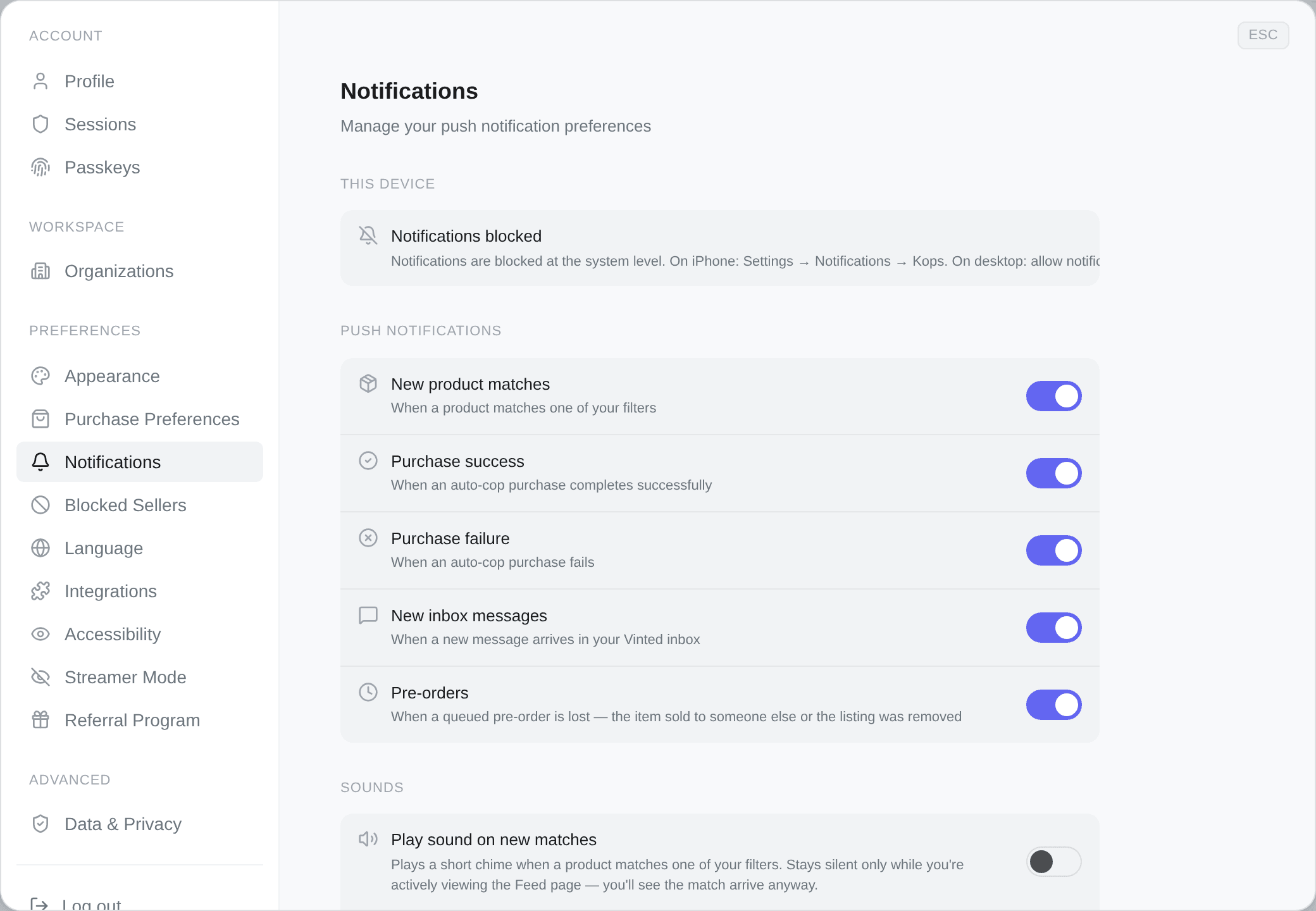
What Kops can notify you about
| When it fires | |
|---|---|
| New product matches | A product matches one of your filters |
| Purchase success | An auto-cop purchase completes successfully |
| Purchase failure | An auto-cop purchase fails |
| New inbox messages | A new message arrives in your Vinted inbox |
| Pre-orders | A queued pre-order is lost — the item sold to someone else, or the listing was removed |
Each is an independent switch, and each applies wherever you have notifications turned on.
Three switches, not one
This is where people get stuck, so it is worth being explicit. A match notification reaches you only if all three are on:
- The notification type — New product matches, above.
- This device — push has to be enabled on the phone or browser you expect it on.
- The filter — each filter has its own Notifications toggle in its editor.
Turning off a filter's notifications does not stop it matching or buying. It stops it telling you.
Push on this device
This device is the first section, and it is its own section because a push subscription belongs to one browser or one phone — not to your account. Enabling it on your laptop does nothing for your phone.
The states it can be in, and what each offers:
| What you see | What is next to it |
|---|---|
| Active — this device receives Kops alerts. | A switch, to turn it off here |
| Disabled on this device. Turn on to receive alerts here. | The same switch, off |
| Notifications are not enabled on this device yet. | Enable — the browser will ask for permission |
| Notifications blocked | Nothing. It is blocked at the system level: on iPhone, Settings → Notifications → Kops; on desktop, allow notifications for kops.gg in your browser's site settings |
| Notifications stopped working | Re-enable. The subscription is no longer valid — this happens after some iOS updates |
| Could not sync the notification subscription. | Retry. This one is a failure to talk to Kops, not a browser refusal |
| This browser does not support push notifications. | Nothing. Use a different browser |
On iPhone, a website cannot send push notifications until it has been added to the Home Screen. The section says so directly — Install the app on your Home Screen (Share → Add to Home Screen) to receive notifications on iPhone — and there is no switch until you have.
Open Kops in Safari, tap Share → Add to Home Screen, then open it from there and enable notifications.
That is an iOS rule, not a Kops one, and there is no way around it.
Sounds
Two sounds, separate from push, and they play while the dashboard is open:
- Play sound on new matches — a short chime when a product matches a filter.
- Play sound on new messages — a distinct chime when a message arrives in your Vinted inbox.
Both stay silent while you are actively viewing the page they belong to — the Feed and the Inbox respectively. You are looking at it; the event arrives on screen anyway.
Sound picks the match chime from three — Soft ping, Tap, Pluck — and tapping one plays it, whether or not the switch above is on, so you can audition them before committing. The message chime is fixed and has no picker; switching it on plays it once.
Discord direct messages
Kops can send alerts as DMs from its bot instead of, or as well as, push. The whole section is absent on a deployment where the bot is not configured.
Setup is Link Discord, then Enable. Send test confirms it works before you rely on it, and Disable stops it without unlinking.
Once enabled, three switches — and the list is shorter than the push one on purpose:
- Purchase success
- Pre-orders
- Account alerts — when a buying account is suspended and needs your attention.
Failures never DM, by design. There is no Discord switch for Purchase failure, and none for New product matches either. Discord carries wins and things you must act on; the rest would be noise in a channel you also talk to people in. If you want to hear about failures, that is push.
Two things break delivery, and both say so plainly on the card:
| What you see | What happened |
|---|---|
| Discord refused the message | Your privacy settings block DMs from server members. Allow them, then re-enable |
| You're no longer in the Kops server | Leaving the server takes the bot's ability to message you with it. Join the server appears beside it; rejoin, then re-enable |
Which ones actually matter
If you turn everything on, you will turn everything off a day later. A working setup usually looks like:
- Purchase success and Purchase failure — always on, as push. These are money, and failure is push-only.
- Account alerts on Discord — always on. A dead account is invisible otherwise.
- New product matches — on for the two or three filters you are actively hunting, off for the rest. This is the per-filter switch, not the global one.
- Inbox messages — on if you negotiate, off if you buy at ceiling.