Automatic acquisition — buy now or negotiate
One number on your filter decides whether Kops buys a match outright, opens a negotiation, or only notifies you. Set that ceiling, then say how the opening offer is built.
Open Filters, edit a filter, and find the Automatic acquisition section. It starts collapsed — its header carries an Autocop or Auto-offer pill when either is armed, so you can see the state without opening it.
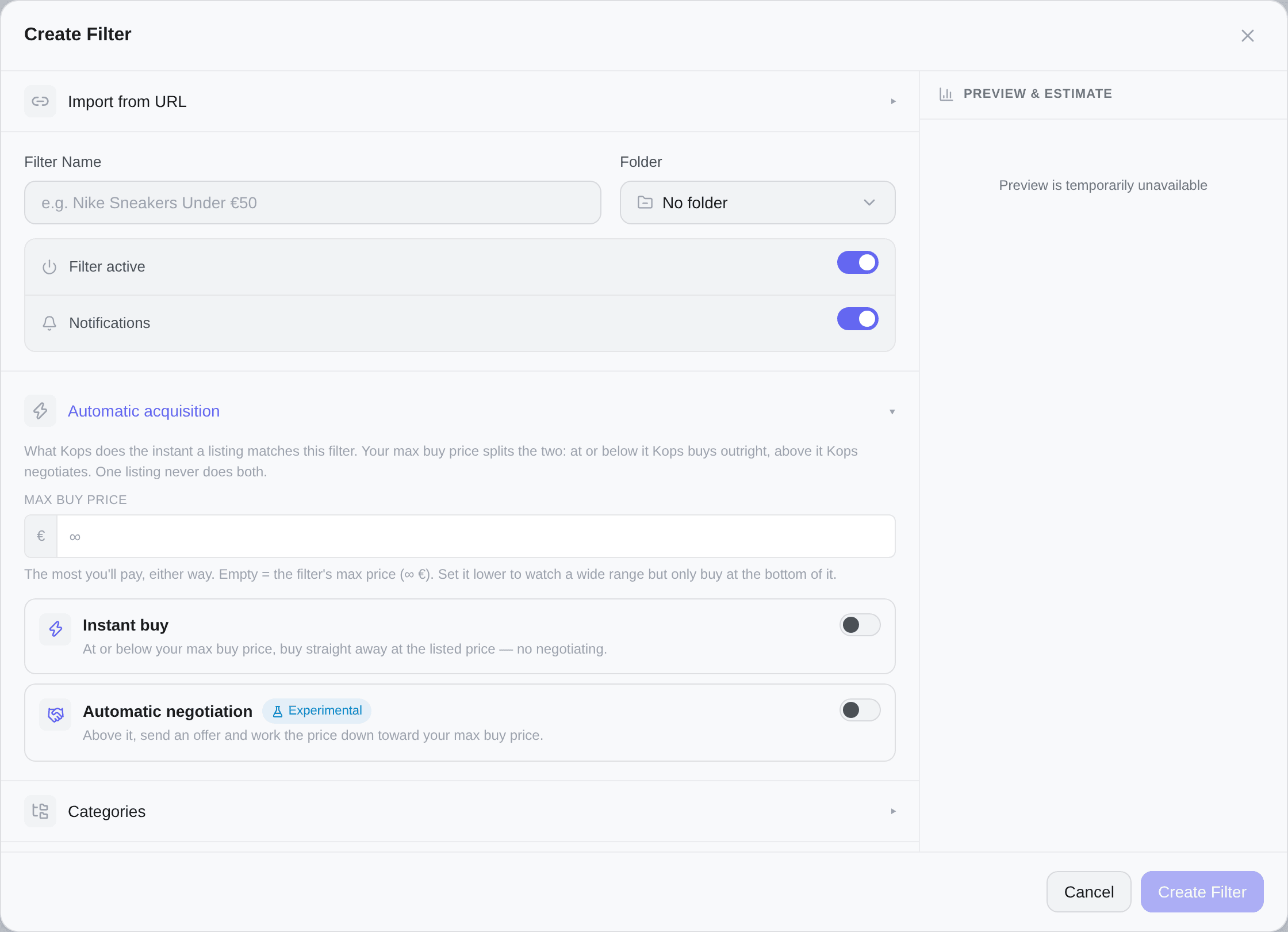
One number splits the price line
Max buy price is the most you will ever pay for a match — whichever route gets there. Everything on this page follows from where a listed price falls relative to it.
Leave it empty and the filter's Max price is used instead. Set it lower than Max and the two numbers start doing different jobs:
| Field | What it controls |
|---|---|
Price Range (Min / Max) | What the filter matches — what shows up in your feed and notifications |
| Max buy price | What Kops is allowed to pay |
That separation is the point. A filter can watch a deliberately wide range — €0 to €200 — while only ever buying under €60.
It must be positive, and at or below the filter's Max when the filter has one: matching already stops there, so a higher ceiling would be a number that never applies. The field turns red and says so rather than saving something inert.
The three bands
| Listed price | What Kops does |
|---|---|
| At or below your max buy price | Instant buy at the listed price |
| Above it, up to twice your max buy price | Automatic negotiation — offer, then work the price down |
| Higher than that | Notification only |
An item never falls in two bands, and the bands never leave a gap.
Vinted refuses an offer below a per-item minimum. Past a certain listed price, no offer we are allowed to make could ever land at or under your maximum — the negotiation would be lost before it started, and opening it still costs a real conversation on your account.
So Kops does not engage there. You still get the notification; nothing is sent.
The boundary is derived from your max buy price, never typed in. It is also clipped by the filter's Max: a band can never extend past what the filter actually matches.
Arming one, the other, or both
Two independent switches, stacked in ascending price order. Three useful combinations:
Kops buys any match at or below your max buy price, at the listed price, with no negotiation. Anything above it is a notification.
This is the classic autocop. Fastest, and the only mode that wins a genuine bargain before someone else does.
With neither armed, the filter only notifies you.
Automatic negotiation is marked Experimental. Its behaviour may still change and some edge cases are being refined. It is usable — keep an eye on your offers. It also needs a plan that includes it; on a lower plan the row is shown but inert, with the plan it belongs to named on it.
Refusing a listing that says "do not buy"
Nested under Instant buy is one setting: Skip "do not buy" listings. It only appears once instant buy is armed, because it governs instant buy and nothing else.
Some sellers write in plain words that you should not buy — the item is reserved, still being photographed, "message me first", price to be agreed. Kops already reads those phrases and puts a Do not buy badge on the card. That badge describes the listing; it has never stopped a purchase. This switch is what makes it decide one.
It ships off, and that is not an oversight: every one of your filters already buys these listings today, so turning it on for you would change what they do without your asking.
It is per member. On a shared filter each subscriber decides for themselves — your refusal does not cost the other one their buy.
It leaves offers alone. A seller who writes "don't buy, make me an offer" is asking for exactly what automatic negotiation does. Only instant buy stands down.
A hand-written list of phrases, in the languages of Vinted's markets (fr, en, es, it, de, nl, pt, pl) — "ne pas acheter", "do not buy", "no comprar", "nicht kaufen"… Conjugations and common typos count: the French NE PAS ACHETE, missing its final R, is recognised.
Two things it deliberately does not do:
- "Don't buy elsewhere" is not a warning. That is a seller asking you to buy from them rather than from someone else. Recognised as such, and ignored.
- It is not an AI guessing. It is a list, and a deliberately narrow one. An unusual phrasing will slip through, and that is the direction we chose to be wrong in: here a false positive costs a purchase, not a pointless badge.
Building the opening offer
Opening discount
How far under the asking price the first offer opens. A slider from 0% to 40%, in steps of 5, defaulting to 20%.
The opening offer is the listed price minus that discount — and never above your max buy price. On a listing already under your maximum, the discount applies to the asking price, so you still offer below it.
Room below your target
How far under its target an offer may go. The target is the asking price, or your max buy price when that is lower.
| Value | What it does |
|---|---|
| Empty | As far down as the discount says |
0 | Offer the target exactly, every time |
| A number | Never more than that far below the target |
It is a risk dial, not a price dial. Opening low leaves longer for another buyer to take the item; opening at the target secures it at your maximum with nothing left to negotiate.
Buy automatically if accepted
When the seller accepts your offer, Kops pays immediately instead of waiting for you.
Negotiate if they counter higher
When the seller counters above your max buy price, Kops answers with converging counter-offers rather than leaving the thread stalled. It needs Buy automatically if accepted — the negotiation converges on that price, so without it there is nothing to converge on. Turn the prerequisite off and this row goes inert and says why; turn it back on and your choice is still there.
See Automatic negotiation for how the counter-offers are chosen and when they stop.
What the seller actually receives
An offer is a price. A message is a separate send, posted in the conversation right after it — the seller sees a price, then a line of text.
A negotiation is therefore a run of prices, with a word at the start and a word at the end:
| When | What is posted |
|---|---|
| Right after the opening offer | Your offer message |
| Right after the final counter-offer | Your last word, on that offer only, if there is one |
Both are on by default, and with no wording of your own it is Kops's that goes out — in the seller's language where it has one.
Worth knowing before you arm this: an automatic offer opens a real conversation on your Vinted account, and a message is posted there under your name whether or not you chose its wording. Read it once, then keep it or replace it.
One switch, and it is not on the filter. Message with your offers, in Settings → Purchase Preferences, governs both: turning it off silences the last word too, on a screen that does not say so. Full detail in Messages to sellers.
What the editor tells you before you save
Under the settings, What happens, by price lists your bands with real amounts — the interval, and one line saying what happens inside it. It is computed from the same rule the engine applies, so what you read before saving is what runs.
Four warnings can appear, each next to the setting that causes it:
| Warning | What to change |
|---|---|
| Set a max buy price | Negotiation is armed with no ceiling anywhere — no filter Max either. There is nothing to aim at, so nothing would be sent. Save is blocked until you fix this, the way an empty name blocks it |
| Instant buy already covers everything this filter matches | Your max buy price is at or above the filter's Max, so nothing is left for the negotiation. Lower the max buy price |
| Offers already open at your maximum | Your room below target is too tight to leave anything to trade. If the seller counters higher, Kops stops immediately |
| With instant buy off, the offer below your max is the asking price | Negotiation-only, with room set to 0. On cheap matches that means offering full price. Leave some room, or turn instant buy on |
The ceiling field also quotes the result as you type: never pays more than €X, whichever way it buys — a negotiation opens around ~€Y.
When there is no ceiling at all
No max buy price and no Max on the filter:
- Instant buy still buys, paying whatever is listed — which is how a filter with no price cap has always behaved.
- Automatic negotiation stands down. There is no target to converge on, so no offer is sent.
A listing whose price never came through triggers neither. Buying at an unknown price is exactly what a ceiling exists to prevent.
Which accounts send the offers
This is not set on the filter. Open Settings → Purchase Preferences → Auto-offers.
By default, offers can come from any of your accounts. Create account groups on the Accounts page first, then pick them under Restrict to these groups — offers will only use accounts from those groups.
It is a separate pool from the one autocop uses, so you can keep one set of accounts for instant buys and another for negotiating.