Deadlines
Four clocks can run on an order and only two of them draw a ring — the two whose expiry takes something away that no later action gets back. Here is which clock is on which status, how long each one is, and why some parcels show no clock at all.
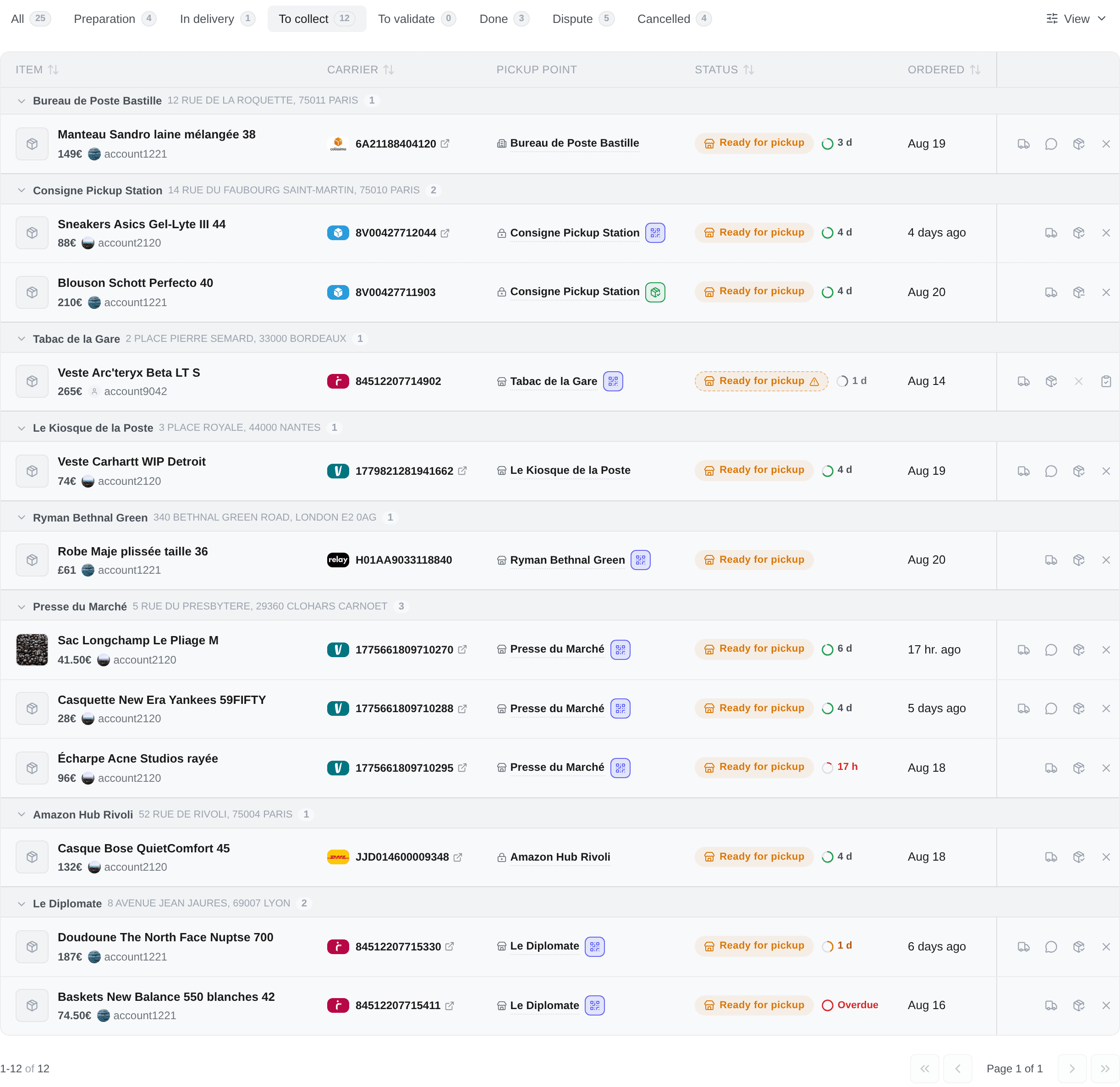
There is no Deadline column. The ring sits inside the Status cell on /purchases, right beside the badge, and Deadline is a sort in the View panel.
That is deliberate: a ring on its own answers how much of something is left without ever saying of what. Next to a badge reading Ready for pickup it needs no legend, which is the legend nobody had while it floated in a column of its own.
Exactly one clock runs on an order at a time, and its status decides which. An order showing two countdowns would be asking you to work out which one matters, which is the job the status already did.
The four clocks
| Clock | Runs while | How long | Missing it costs |
|---|---|---|---|
| Shipping deadline | Awaiting label, Label ready | 5 business days | Nothing — but it is the moment you can cancel and re-buy |
| Delivery estimate | In transit, At verification | The carrier's own transit window | Nothing. A parcel a day past its estimate is an ordinary Tuesday |
| Pickup hold | Ready for pickup | The carrier's published hold, 5 to 14 days | The parcel. The point ships it back to the seller |
| Confirmation deadline | Delivered | 2 calendar days | The right to refuse the item |
Only the last two draw a ring. Four rings with four different meanings made none of them read as anything: a ring saying the seller is slow looked identical to one saying the shop posts it back on Friday. The bar a clock has to clear is not "is it running" — it is: you can still act on it, and letting it run out takes away something no later action gets back.
The other two are still computed and still sortable, which is the whole point of keeping them. They simply do not shout.
Two rows also go quiet on purpose. A parcel whose account can no longer sync keeps its ring but drops to grey and stops pulsing — an alarm is a request to act, and every button beside it is dead. And an order you have closed yourself shows no ring and no estimate at all: once you have said the parcel is settled, a clock counting down to nothing is not dimmer information, it is wrong information.
The shipping deadline
Five business days from the moment the payment goes through, in the French calendar — public holidays and weekends do not count against the seller.
Nothing is destroyed when it expires: Vinted refunds an order the seller never ships. It matters because it is the point at which the item is still available and you can cancel and buy it again somewhere else, and only you can decide that is worth doing.
The delivery estimate
Two different things share this name, and only one of them is on screen.
What you see, as a date range under the status badge, is Vinted's own arrival window. Vinted publishes it as prose in the account's market language and with no year — 7 août - 11 août on a French account, Aug 07 - Aug 11 on a British one — so it is parsed on our side and re-rendered in the language you read Kops in. Vinted attaches one only while a parcel is moving, so it draws on the In delivery tab and nowhere else. When Vinted publishes none, nothing is drawn: there is no marker saying so, because a reader can do nothing about it.
The clock of the same name is separate, and it is the carrier's published transit window rather than Vinted's estimate. It draws no ring — it is the advisory one of the four — and exists so that sort by deadline has an answer on a parcel in transit. Neither is a fallback for the other; a row can carry both, one, or neither.
The pickup hold
The one deadline whose expiry destroys the purchase. When it runs out, the pick-up point hands the parcel back to the carrier and the carrier returns it to the seller — the order lands on Returned to sender, and nobody asked for it.
Its length belongs to whoever is carrying this parcel, so it is read from the operator's own published terms:
| Carrier | At a staffed relay | At a locker |
|---|---|---|
| Colissimo | 14 days | 5 days |
| Chronopost | 7 days | 5 days |
| Vinted Go (France) | 7 days | 7 days |
| Mondial Relay | 5 days | 5 days |
| DHL Express | 7 days | 7 days |
Every figure is calendar days.
Two operators publish a different window for a staffed relay and for a locker. When the order says which kind of point it is headed for, the right one is used. When it does not — a home delivery, an order not bought through Kops, or simply a point whose type Vinted did not report — Kops takes the shorter of the two and marks it Estimated.
Estimated does not mean advisory. The clock runs either way; only its exact end is inferred, and it is inferred in the direction that has you arrive early. Being two days early costs nothing. Being two days late costs the parcel.
Because no honest number exists for them, and a guessed countdown on this particular deadline is worse than a blank.
It happens when the carrier is one whose hold window nobody publishes, or when Vinted attached no carrier logo to the shipment. Carrier codes are not a substitute: the code names a routing network rather than the brand that ends up carrying the parcel, and quoting one operator's five days for another's locker is exactly how a parcel goes back.
A blank cell costs you one click into the tracking page. Take it.
The confirmation window
Two calendar days from delivery — the clock does not stop for a weekend.
Inside it you can confirm receipt, which releases the payment to the seller and ends the order, or report a problem, which suspends it while Vinted looks. When it expires Vinted confirms on your behalf, pays the seller, and the window to refuse the item closes for good.
That is what the To validate tab is for. It is a small tab and it is the one worth opening daily.
Reading the ring
Beside it, the time left — in days, then hours, then under an hour. Never seconds: these windows are whole numbers of days read off a carrier's terms page, and a stopwatch would claim a precision they do not have.
| What you see | What it means |
|---|---|
| A ring, calm | More than half the window left |
| A ring, warning | Under half left |
| A ring, danger | Under a fifth left |
| A full ring, pulsing | Overdue. A full ring, not an empty one — an empty ring is indistinguishable from a row with no clock at all |
| A ring, grey and still | The account can no longer act on it — see below |
Hover it for the rest: which clock it is, the long form of the time left, Estimated when the window's length was inferred, and This account can no longer act on it when the account is frozen. The clock is still real there; you simply cannot answer it through Kops any more.
Sorting by Deadline puts the soonest clock first across every row that has one — including the two that draw nothing, which is how the shipping deadline and the transit window earn their keep.