Changing plan
Upgrades land immediately and are prorated, downgrades wait for the end of the period, and one of the two can be refused outright. Plus annual billing, promo codes, and what "sold out" means.
Workspace settings → Subscription. Admins can change it; an employee sees the tab with the plan and the meters, and none of the buttons.
The plans themselves — what each one unlocks and how many accounts it carries — are in Plans and limits. This page is about moving between them.
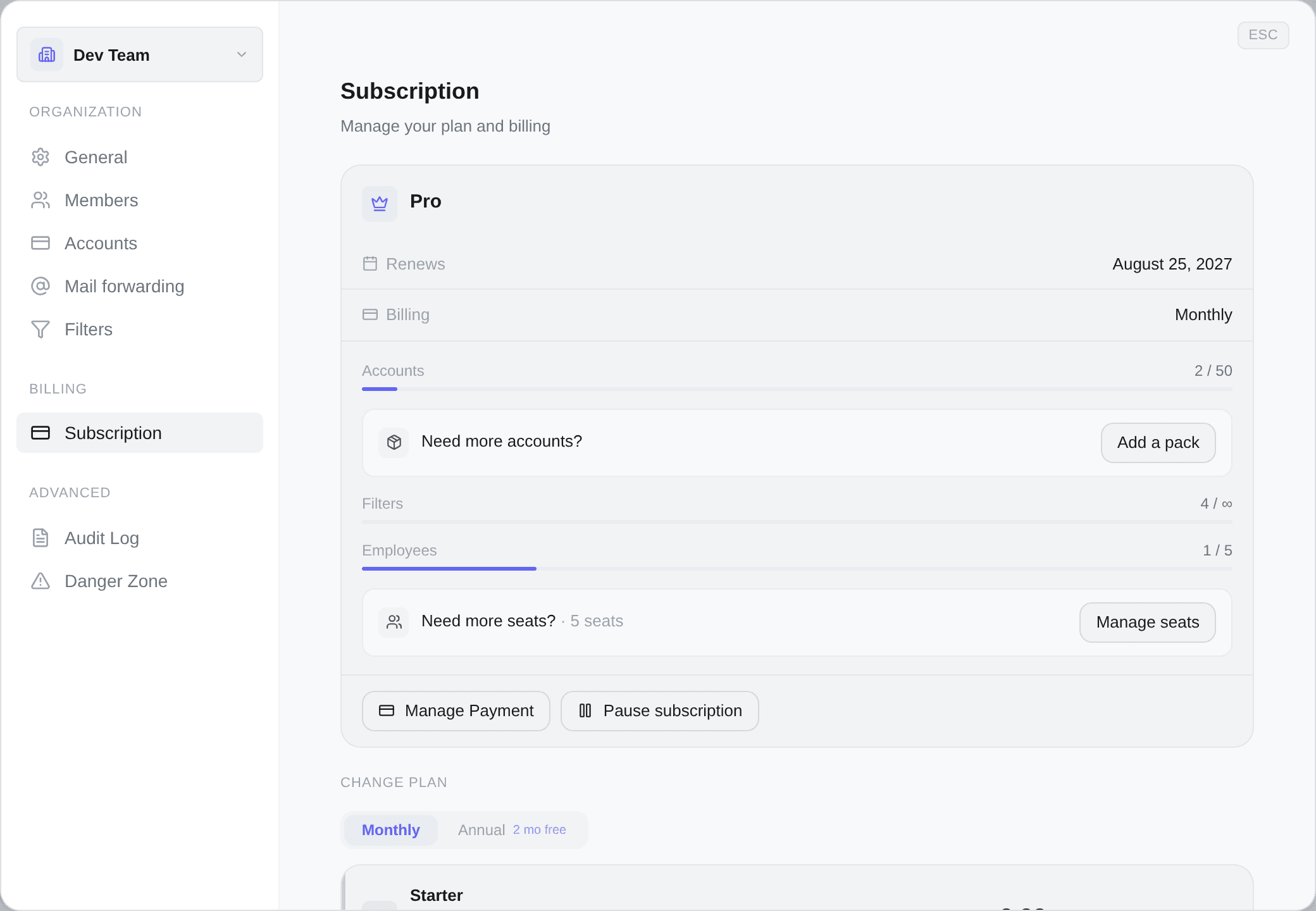
What the page tells you
A card with your plan, any badges it has earned (Trial, Paused, Canceling, or an arrow to a plan or interval you have scheduled), then two lines: when it Renews — or Resumes, or Access until if it is ending — and whether you are Monthly or Annual.
Under that, a meter per resource: Accounts, Filters, Employees. A meter is only drawn for a resource the plan actually carries, so Starter shows neither accounts nor employees, and a plan with unlimited filters reads 12 / ∞. Add-on controls sit inline under the meter they raise — see Account packs and seats.
If anything is scheduled — a downgrade, a billing-interval switch, a pause — it is shown as a banner with the date it takes effect and an Undo next to it. Nothing scheduled ever happens without having sat there visibly first.
Upgrading
Immediate, and billed pro rata: you pay for the part of the period you actually use at the higher price, not a fresh full month.
The dialog previews the exact amount before you confirm — Prorated amount, Charged, and your next billing date. Nothing is taken until you press Confirm Upgrade.
Your new capacity is available the moment the payment goes through. There is no waiting for a renewal.
Have a promo code? on the upgrade dialog. Enter it, press Apply, and the discount is shown before you confirm — as a percentage off, and with when it applies (Immediately or From your next invoice). Remove takes it back off.
Two refusals you may see:
- This code isn't valid or has expired.
- This code can't be used for upgrades. — some codes are for new subscriptions only.
A code applied here is visible in the dialog's total. If you cannot see the discount in the preview, it has not been applied.
Downgrading
Scheduled for the end of your current billing period, never immediate.
You keep full access to your current plan until that date, and no refund is issued for the remaining time. That is the trade: you paid for the period, you get the period. The button says Schedule Downgrade rather than Downgrade, for that reason.
The banner then says Downgrade scheduled with the date, and Undo cancels it as long as it has not taken effect.
A downgrade can be refused
If you are using more than the target plan allows, the button is blocked and tells you what to fix:
- You have more accounts than the {plan} plan supports. Remove some accounts before downgrading.
- You have more team members than the {plan} plan supports. Remove some employees before downgrading.
Kops will not quietly cut you down to size. Deciding which five of your fifteen accounts survive is your call, not ours.
Monthly and annual
Annual is ten months for twelve — the interface calls it Save 2 months.
Switching to annual is an upgrade in direction: immediate, prorated, and the dialog is titled Switch to Annual Billing. Switching to monthly is a downgrade in direction: Schedule Switch, at the end of the current period, and you keep your annual pricing until then.
Annual billing disables pausing. A pause starts when your paid period ends, and on annual that can be many months away — so the button is disabled and says so. Switch to monthly first if pausing is something you want available. See Pausing and cancelling.
The trial
Starter comes with a 3-day trial — and only Starter. A card is required to start it, nothing is charged until the three days are up, and cancelling before then costs nothing at all.
While you are on it the plan card carries a Trial badge and a banner counts the days down to Trial ends today. An upgrade during the trial shows No charge — trial.
Hitting a limit
Two dialogs, and both name the exact resource:
- Account limit reached — with a meter showing accounts in use. Add an account pack or change plan.
- Filter limit reached — filters are unlimited on every current plan, so this one only appears on a workspace with no active subscription.
Sold out
A plan can be temporarily Sold Out, with {count} spots left shown while there are some. When it is, the button becomes Join Waitlist and you are emailed when spots open.
This is a real cap, not a marketing device: it exists because capacity is finite.
When you cannot change plan at all
| What you see | Why |
|---|---|
| You have an unpaid invoice | Settle it first. While past-due the plan grid is still there, with a warning above it, and clicking any plan takes you to pay the invoice instead — then the upgrade works, with automatic proration |
| A previous payment is awaiting bank authentication | Complete the 3-D Secure verification, then upgrade |
| A plan change is already scheduled | Undo the scheduled one first |
| Your subscription is set to cancel | Reactivate it first |
| No plan grid at all | You are paused, or a pause is booked. Neither state can change plan, so the section is hidden rather than shown and then refused |
| Only the owner can manage billing | Your role, not your plan — ask an admin |
The first two are covered in Payment problems.