Pre-orders
A standing instruction to buy an item that is not on sale yet, the second it is released. How to place one, the eleven ways it can end, and why the price says "Revealed at release".
The list is at /pre-orders. Placing one starts on a product card, from the Pre-Order button. Pro plan — without it, the button and the page are not there at all.
What a pre-order is
Some listings arrive in your feed while Vinted is still verifying them. They cannot be bought yet — the item exists, the seller has posted it, and the marketplace has not made it purchasable.
A pre-order is a standing instruction on one of those: when this is released, buy it. Kops holds it and fires the moment the listing goes live, with no action from you.
That is why it wins. By the time a verified item shows up in a normal feed, a pre-order on it has already fired.
Placing one by hand
On the card of an item still in verification, the Pre-Order button arms it. The button then reads Pre-Ordered; click it once to ask Leave queue?, and again within a few seconds to confirm. Let it settle and it goes back to Pre-Ordered — nothing is undone by a stray click.
Hold the button instead of tapping it and you get the full picker: which account will buy, whether to ask Vinted for item verification, and which carrier to use — the same choices the Buy button's hold gesture offers.
A manual pre-order is yours: it fires at release whether or not autocop is on, and it is not subject to repost protection. You asked for that specific item, deliberately.
If a listing already has as many pre-orders as it can hold, arming yours is refused with Queue is full — try again later.
Automatic pre-orders
An armed filter that matches an item still in verification queues a pre-order for it by itself. These behave like any other autocop fire — they obey your account restrictions, repost protection, and the global switch.
One consequence is worth knowing before you see it on the page: automatic pre-orders are placed before the seller has set the final price. The price column shows Revealed at release until the item drops.
That is not a missing value. On a listing still in verification there is no final price to read, and the pre-order was placed on the item, not on a number.
The filter's ceiling. A pre-order queued from a filter is re-checked against that filter when the item is released — and a listing whose seller changed it during verification so that it no longer matches is not bought. You will see it in the history as Skipped — no longer matches.
Manual pre-orders have no such check, because there is no filter behind them. If you pre-order by hand, you are accepting whatever price the item is released at.
The page
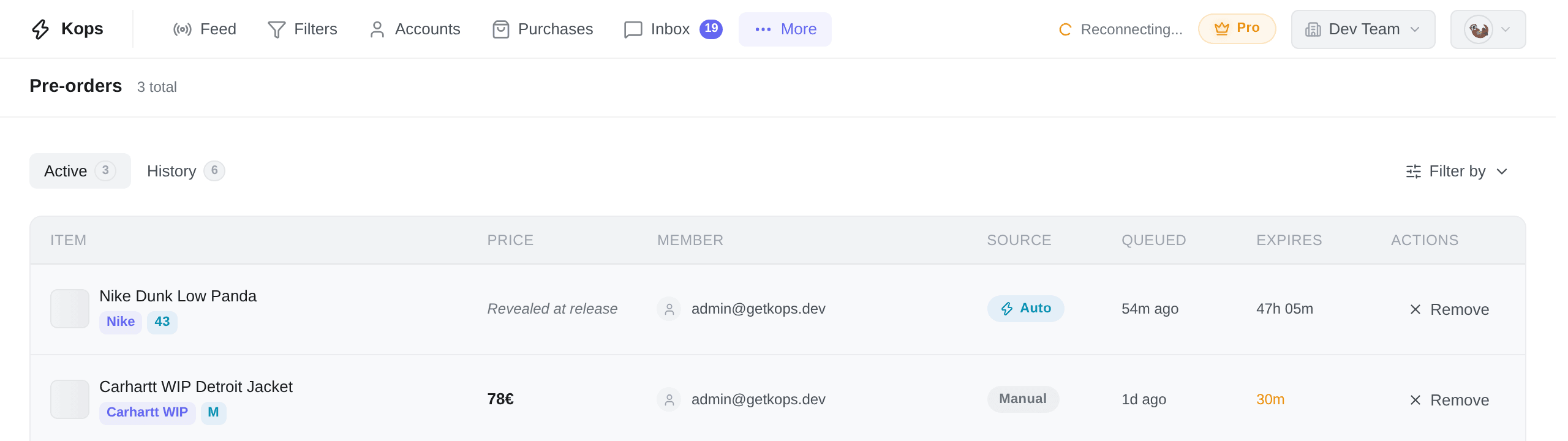
Two views, switched at the top: Active for pre-orders still waiting on a release, History for everything that has resolved.
They do not show the same columns, and History leads with the answer.
| Column | What it holds |
|---|---|
| Item | Photo, title, brand, size |
| Price | The price when it was queued, or Revealed at release |
| Member | Who armed it |
| Source | Manual or Auto |
| Queued | When it was armed |
| Expires | The countdown, and Expiring… near the end |
| Actions | Remove — but only on your own rows |
Removing is a personal act: a teammate's pre-order shows a dash here, not a disabled button. You cannot drop someone else's.
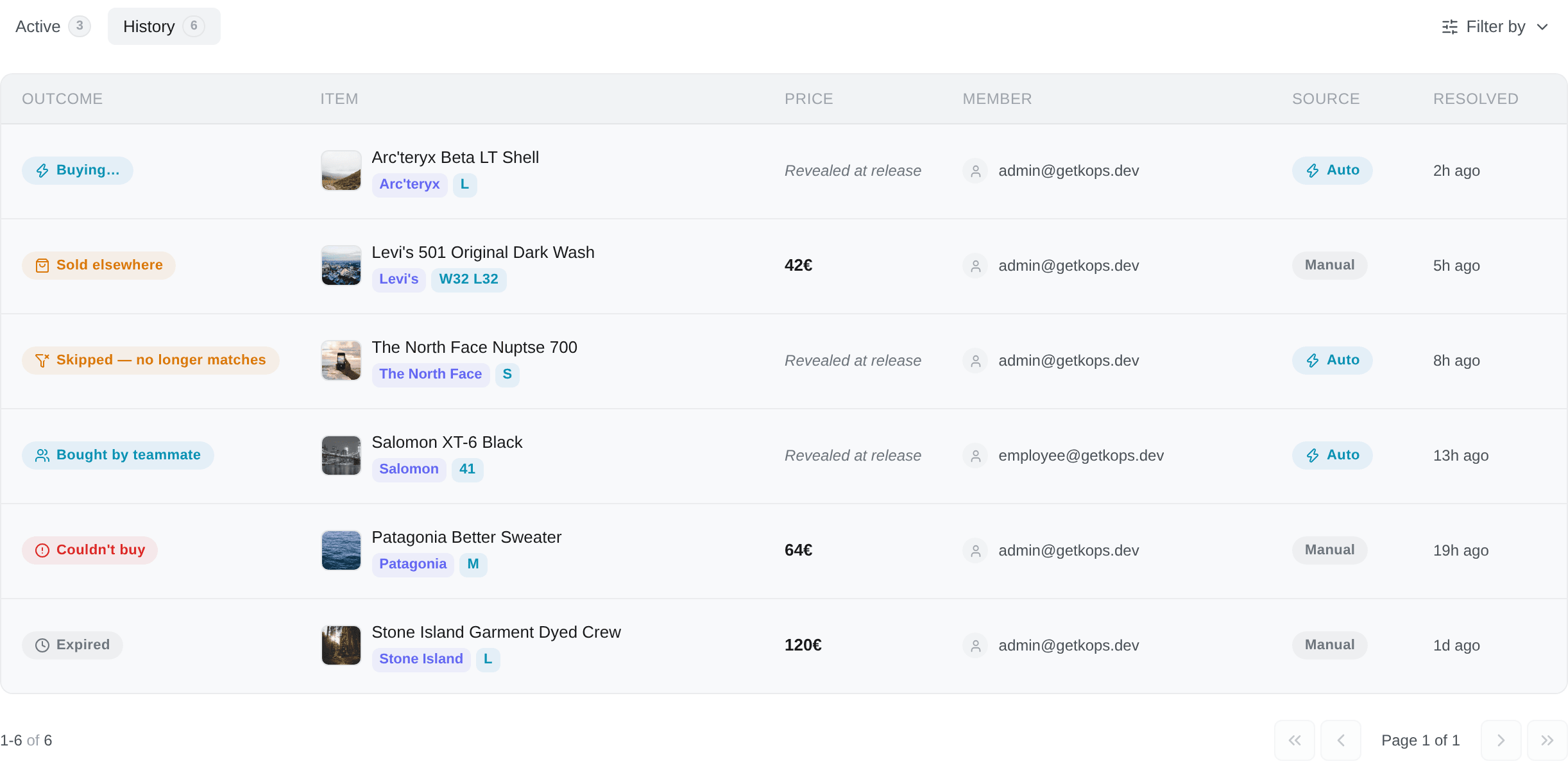
Filter by — the panel offers Member and Source on both views, and Outcome on History only. Each takes one value at a time. There is no sorting, no grouping and no column picker here, because the list has nothing to offer them.
A pre-order does not wait forever
An active pre-order has a deadline. If the seller has not released the item by then, it is dropped and appears in History as Expired.
The row tells you when. The Expires column is a live countdown to that entry's own deadline — calm in hours, amber under an hour, red under five minutes — and it is the only number worth trusting, because the window is a setting rather than a promise: it is tied to how long we keep polling an item through verification, and the two always move together. Today that window is 48 hours.
That is a ceiling, not a target. Most releases happen within minutes.
How a pre-order ends
| Outcome | What happened |
|---|---|
| Pending | Still waiting for the release |
| Buying… | The item was released and a purchase is running — open it to follow the result |
| Expired | The deadline passed with no release |
| Removed | You removed it before the release |
| Listing removed | The seller deleted the listing before it was released |
| Sold elsewhere | The seller sold the item before your pre-order could fire |
| Seller blocked | You blocked the seller, so the pre-order was dropped |
| Skipped — autocop off | Your global autocop was off at release, and the pre-order was an automatic one |
| Skipped — already bought | Repost protection: you had already bought from that seller |
| Skipped — no longer matches | The seller changed the listing during verification and it stopped matching its filter |
| Bought by teammate | Another member's pre-order took the item for your workspace |
| Couldn't buy | It fired and the purchase failed — see below |
At release, every pre-order on that listing fires at once — there is no queue position, and being first to arm buys you nothing.
What is capped is the outcome: one purchase attempt per workspace per item. Two colleagues racing the same listing on your own accounts would only be competing with each other, so the first to complete takes it for the workspace and the other reads Bought by teammate.
When it fires and cannot buy
Couldn't buy carries a reason, and every one of them ends with the same sentence: you weren't charged.
| Reason | Meaning |
|---|---|
| The item was already gone | Somebody bought it between the release and our checkout |
| No buying account was available | Wrong country, or no account assigned to that folder or group |
| Your card needed 3-D Secure | The bank challenge could not complete in time |
| Vinted blocked the checkout | Vinted refused the request |
| Vinted's servers errored | A failure on their side during checkout |
| The purchase timed out on our side | Ours. Nothing was ordered |
| Something went wrong on our side | Ours, and not one of the above |
Settings
Settings → Purchase Preferences → Pre-orders. The section is only there on a plan that has pre-orders.
Pre-order groups override which account groups handle pre-order purchases. By default, a pre-order reuses the autocop group of the folder it came from — set this only when pre-orders should run on a different set of accounts than everything else. It is one of the four account pools.
Buy pre-orders even when autocop is off — off by default. With it off, automatic pre-orders are only bought if your global autocop is on at the moment of release; a pre-order queued while it was on and released while it was off is skipped. Turn it on and automatic pre-orders fire regardless.
Manual pre-orders ignore this setting entirely. They always fire.
Removing one
Remove, on an active row, or the button on the product card itself. The item will not be bought when it is released, and the entry moves to History as Removed.
Removing is not the same as blocking the seller: a new listing from them still matches your filters. Blocking them does drop the pre-order, and History says so — Seller blocked.