The buy bar
The strip at the bottom of a conversation is the whole purchase in one control — offer, buy, arm an auto-buy on this one listing, follow a purchase live, clear 3D Secure, and retry a failure without losing the thread.
At the bottom of every conversation on /inbox where there is still something to buy or something to report.
What the bar is showing you
It has one job: never claim more than it knows. It is in exactly one of these states.
| State | What it means |
|---|---|
| Buy Now, and Offer beside it | Nothing has happened on this item yet. Each button appears only where Vinted still allows it |
| Buying…, over Purchase in progress | A purchase is running. The same button cancels it |
| 3DS Verify, over Verify your payment to complete | Your bank is asking for 3D Secure. The button opens the challenge |
| Action required, over Finish on Vinted to complete | Vinted wants something done on their own site — usually your card's security code |
| Purchased, over Purchased {when} | It went through. The total you were charged sits under the button |
| Purchased, over Auto-bought at {price} · {when} | The same, fired by an armed auto-buy rather than by you |
| A failure, with the reason | The purchase ended badly. Retry, or dismiss it |
A short skeleton before any of these is normal — the bar is reading what actually happened before it says anything. It will never show you a clean Buy Now over a purchase that has just failed.

Everything that is not the one action that matters right now lives in the chevron, labelled More actions. What is in it follows the state:
- Before a purchase, and after a failure — Buy with specific account (the same choice a long press on Buy gives you, and where the verification and carrier overrides live) and Create a bundle.
- During one, on 3D Secure or Action required — Retry Purchase, Cancel the order, and Offer. Mid-flight the bar has no room for a dedicated Offer button, and a stalled payment should not strand your ability to negotiate instead.
- On a receipt — Retry Purchase, Cancel the order, Offer, Create a bundle. The deal is closed, so the offer is demoted rather than removed: a refused debit leaves Vinted's offer action open on a thread you have already been shown a receipt for.
While a purchase is actually moving there is no caret at all: the button is already Cancel, and stacking Retry on it would let a double tap start two purchases.
Making an offer
Offer opens the form.
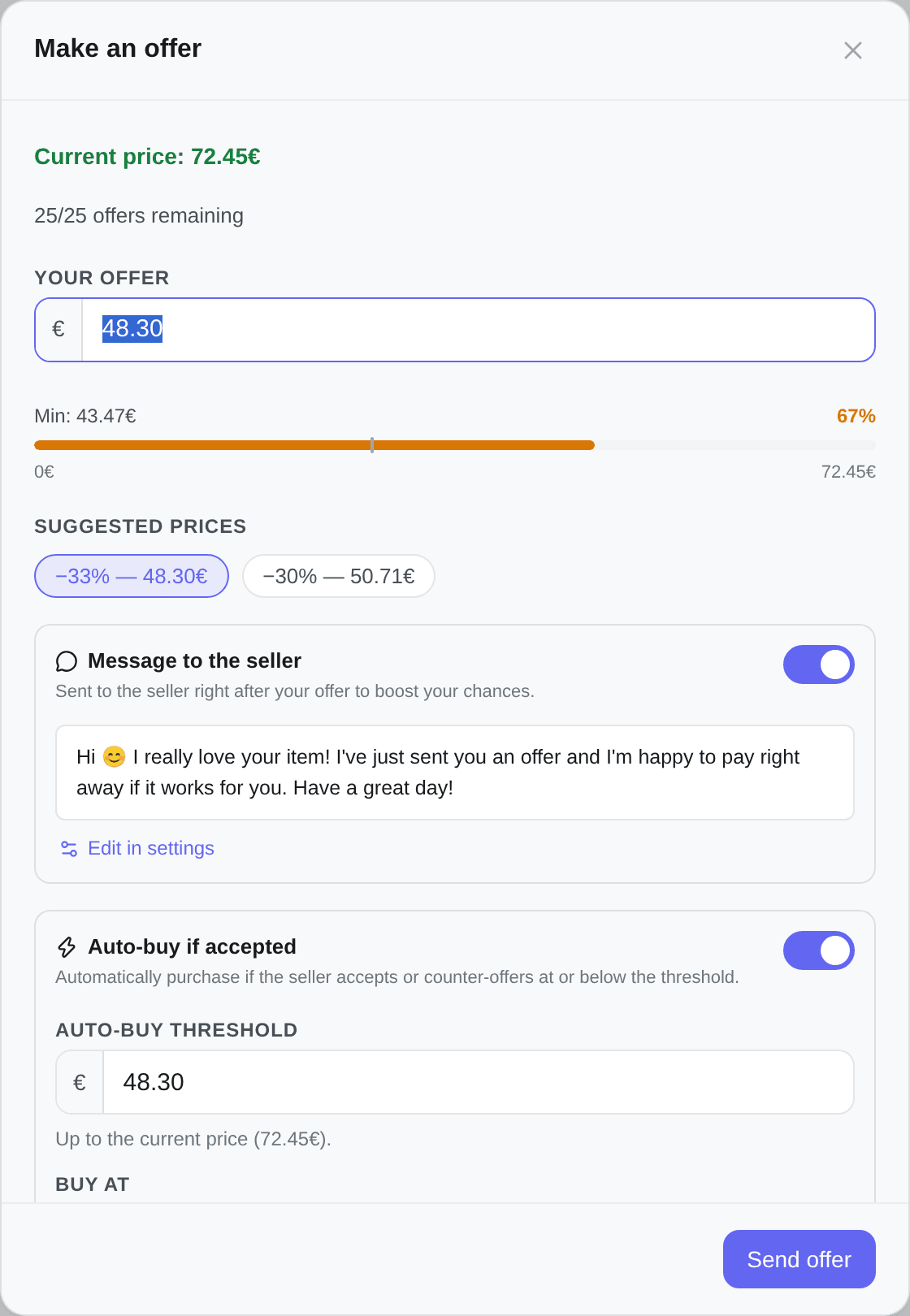
- Your offer, opening on the discount you last actually sent at — the deepest one until you have sent any, because that is what the row of quick picks is for.
- Suggested prices — chips aiming at −50%, −40% and −30% off the current price, each raised to the lowest price the offer may name. Each prints the discount it actually reached (
−33% — 48.30€), and two that land on the same price become one, so you often see two chips rather than three. - A gauge under the field showing what percentage of the price your offer is, red below the floor, amber for the ten points above it, green beyond. Min: on its left is the lowest price you can send.
- Current price: {price} for reference, and Between {min} and {max} — the band Vinted accepts — until the gauge takes over.
- How many offers you have left on this listing, as {remaining}/{max} offers remaining. Vinted caps them; at zero the form says No offers remaining and the price field, the message and the auto-buy section all go away with it.
An offer cannot go more than 40% below the current price, and that limit is Kops', not Vinted's — Vinted's own minimum sits lower. The effective minimum is whichever of the two is higher, which is why the message names a number rather than a rule: Offers can't go more than 40% below the current price — the minimum is {min}.
It applies to a hand-typed price and to the chips alike. The −50% chip is deeper than the floor, so on most listings it is clamped to it and prints the discount it actually reached.
Under the price, Message to the seller — Sent to the seller right after your offer to boost your chances.
It is prefilled with one of your saved messages, picked at random on each open, or with the default text when you have none. Previous message / Next message cycle through them, and Edit in settings takes you to where they are managed. Switch the section off to send nothing.
A message you type here is sent exactly as you typed it — auto-translation never touches it. See Messages to sellers.
If Vinted refuses the price, it says which: too high, too low, an offer already exists, or simply that Vinted rejected it.
Auto-buy on this listing
The section under the offer: Auto-buy if accepted.
Automatically purchase if the seller accepts or counter-offers at or below the threshold.
It is on when the form opens, at the price you are offering — so sending an offer normally arms an auto-buy at the same number, and the way to send a bare offer is to switch this section off first.
The Auto-buy threshold goes Up to the current price, and Kops buys the instant the seller agrees to it. That covers both cases: they accept your offer, or they counter at or under your number. The threshold follows the offer price as you change it until you edit the threshold yourself, after which it stays where you put it. Use offer price ({price}) puts them back in step, and the same −50/−40/−30 chips are there.
The verification and carrier choices you make here are stored with the trigger and applied when it fires, so an automatic purchase buys on the same terms a manual one would have.
This is per conversation. It is not the filter-level setting, which arms whole searches in advance — see Automatic acquisition.
Negotiate if they counter higher turns the second half on:
If the seller counters above your threshold, Kops answers with converging counter-offers until they reach it — or stop moving.
It is off by default, unlike the auto-buy itself: you are right here and can negotiate by hand. It cannot be armed on its own — it takes its ceiling from the auto-buy's threshold, so the two are one automation split at a price rather than two settings.
The full list of stop reasons and the logic behind each round are in Automatic negotiation.
The chip, and what it opens
A chip beside the price says the state at a glance: Auto-buy when nothing is armed, ≤ {price} when it is, Paused, or — once it has fired — Bought at {price}, Buying at {price}…, Autobuy failed at {price} or Autobuy fired. While a negotiation is live it also carries a 🤝 badge counting the rounds; once the negotiation ends the count is history and moves into the panel.
Pressing the chip opens a panel under the bar, and what is in it follows the same state:
| Panel | What it says, and what it offers |
|---|---|
| Auto-buy this listing | What an auto-buy does, and Set up auto-buy |
| Auto-buy armed / Auto-buy paused | Triggers when the seller agrees to ≤ {price}, and when you armed it — plus Edit, Pause / Resume, Remove |
| Auto-bought at {price} | Purchase in flight — track it from the attempts page, plus View attempt, Re-arm, Dismiss |
| Autobuy failed at {price} | The classified reason, plus Retry purchase, Re-arm, Dismiss |
| Autobuy fired — outcome unavailable | Exactly that, plus Re-arm and Dismiss |
| Negotiating / Negotiation paused / Negotiation ended | round {n}/{max} and we offered {price} — or, once it has stopped, why — plus Pause / Resume and Remove |
Autobuy fired — outcome unavailable is deliberate and is not a failure: it means the trigger fired but Kops cannot point at the purchase it produced. It is shown rather than assumed to have worked.
Retry purchase and Re-arm are different intents — retry buys now, re-arm puts the trigger back on watch for the next round of offers.
When a purchase fails
A failure is shown with its reason and stays there, because you were probably not watching when it happened. Two ways out:
- Buy Now — retries the purchase. Absent when Vinted has left nothing to buy.
- Dismiss failure, the close beside the reason — clears the banner for good on this browser. Dismissing an automatic one also removes the trigger, so the chip cannot go on reporting a failure the banner has stopped showing.
An automatic fire always leaves this banner. A purchase you started by hand normally reports through a toast instead and the bar resets to buyable — unless there is nothing buyable left to reset to, in which case the banner stays rather than leaving you with a thread that shows no trace a purchase was ever attempted.
When there is no bar at all
Four reasons, all of them correct:
- There is no item. A plain conversation, or a thread with Vinted support, has nothing to put in a bar.
- The purchase is over. Vinted keeps this thread open for buying in exactly two states — while the payment is pending, and after a refused debit. Paid, shipped, completed, cancelled, refunded or in dispute, the bar retires; what you do now lives in Actions on an order and Disputes.
- Vinted closed the listing. A seller who deletes the listing mid-negotiation ends the purchase earlier than the order status does, and the bar goes with it.
- You dismissed the failure and nothing is left. No buy, no offer, nothing to report — nothing to draw.
An empty bar would read as no purchase was attempted here, which is the one thing it must never say by accident.