Order statuses
Seventeen statuses, not three. Each one says what is happening to the parcel right now and which tab holds it — plus what to do when Vinted stops answering for an order and its status freezes where it stands.
The Status column on /purchases, and the Status filter in the View panel.
Vinted's own order state barely moves once you have paid — the same value covers a parcel still on the seller's table and one already in your hands. Kops reads the shipment underneath it instead, so the status says what is happening to this parcel, right now.
Preparation
Money is moving, the parcel is not.
| Status | What it means |
|---|---|
| Payment pending | Vinted is still taking the payment. Nothing to do yet |
| Awaiting label | Paid, and the seller has not ordered a shipping label yet. The shipping clock is running |
| Label ready | The label exists but no carrier has scanned the parcel. Still the seller's clock — printing a label is not shipping |
| Unknown | Vinted reported a state we do not recognise. The order still appears, still counts, and files here rather than being hidden |
In delivery
| Status | What it means |
|---|---|
| In transit | The parcel is on its way to you |
| At verification | The item is at Vinted's authentication centre. Separate from plain transit because the parcel is stationary and the wait is Vinted's, not the carrier's |
To collect
| Status | What it means |
|---|---|
| Ready for pickup | Waiting for you at the pick-up point. A hold clock is running |
The only status on this page whose clock, run out, destroys the purchase — the point hands the parcel back and it goes to the seller. It is also the only tab holding exactly one status, and that is why it has one: behind In delivery it sat under a pile of rows that need nothing from anyone.
Its length is the carrier's, not Vinted's. So is the delivery estimate two rows above — see Deadlines for which clock comes from where.
To validate
| Status | What it means |
|---|---|
| Delivered | The parcel arrived and the payment is being held. Confirm it to release the money, or report a problem |
Two days, then Vinted confirms on your behalf and pays the seller — which closes the window to refuse the item for good. See Deadlines.
Done
| Status | What it means |
|---|---|
| Completed | Settled. The seller has been paid and nothing on the row can still change |
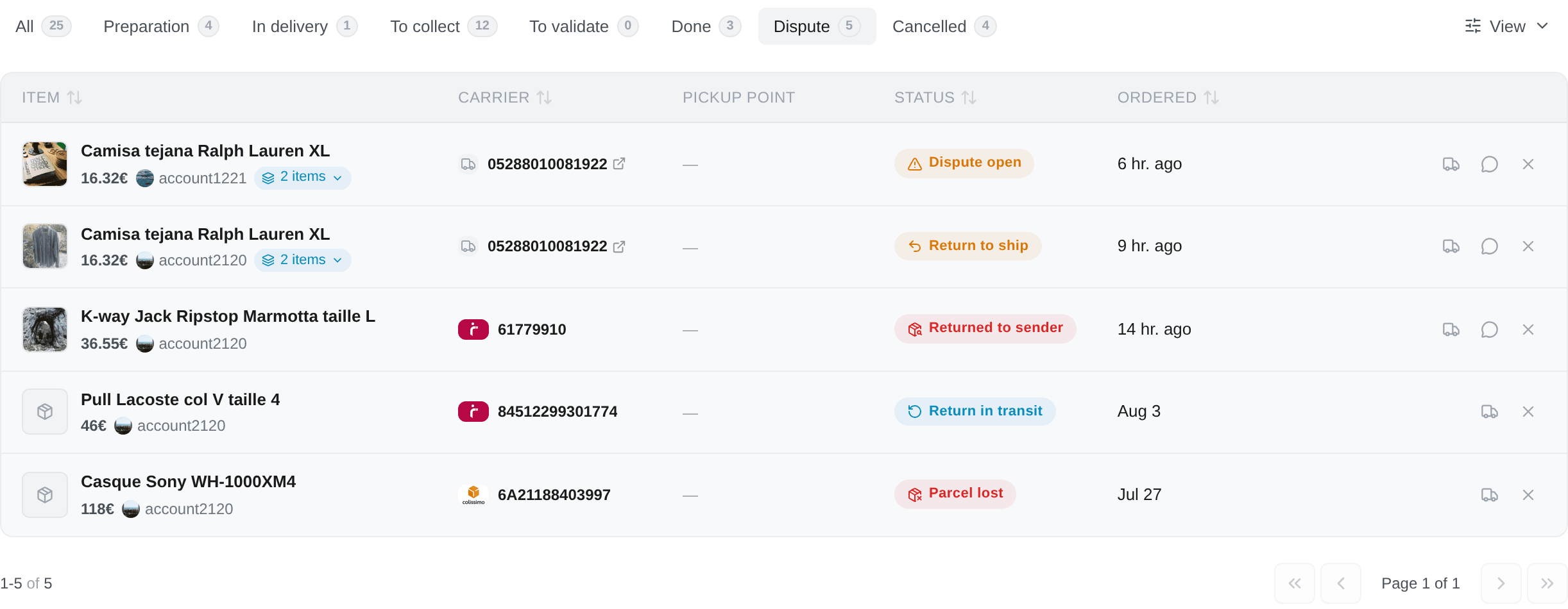
Dispute
| Status | What it means |
|---|---|
| Dispute open | A dispute is open on this order and Vinted is waiting on a reply |
| Return to ship | You have to send the item back. A clock is running, and no refund moves until you do |
| Return in transit | The return parcel is on its way back to the seller. Nobody has to act |
| Parcel lost | The carrier lost it. Your refund is being handled — but a claim has its own window |
| Returned to sender | The parcel went back to the seller without reaching you, usually an expired hold at a pick-up point. Nobody asked for this one, which is what makes it different from a return |
Cancelled
| Status | What it means |
|---|---|
| Payment failed | The debit was refused. The order will not go through |
| Refunded | The money has been returned to you |
| Cancelled | Cancelled by you or by the seller, with no dispute attached |
The order the list is in
Newest purchase first, and nothing else. A status never promotes a row.
That is a deliberate choice and it used to be the other one: the list led with the status, so every Ready for pickup row floated above every In transit one whatever the dates said. It reads well described and badly on screen — the only ordering the table shows you is the Ordered column, so rows that did not follow it looked shuffled for no reason you could see.
Urgency is two other controls instead, and both are yours to drive:
- the tab strip, which is the coarse cut — To collect and To validate exist precisely because they hold the rows with something to lose;
- sorting by Deadline, which puts the soonest clock first across every row that has one.
Two statuses draw a countdown ring, and they are the two whose expiry takes something away that no later action gets back: Ready for pickup (the parcel goes back to the seller) and Delivered (Vinted confirms on your behalf). Everything else is read, not chased.
Unknown is worth a look rather than a shrug: it means Vinted answered with something we do not recognise, so it files under Preparation and stays counted rather than being hidden.
When a status is frozen
An order can only keep its status current for as long as the account that placed it can still talk to Vinted. When that account is banned, deactivated or disconnected, the order stops updating — permanently. The row says so:
Status frozen — Vinted's own words: «…»
Two shades of it, and they are not the same claim:
- The status was read from the order itself on a given date. It was true then, nothing has changed it since, and nothing will.
- The status came from Vinted's order list and was never checked against the order — so it was a summary even at the time.
The row tells you which, along with the reason and how long ago the last read was. Reactivating a deactivated account or re-adding a disconnected one resumes tracking; a banned account cannot come back.
Closing a frozen order yourself
Every button that goes through the account's Vinted session goes grey on a frozen row, and one new button appears: Close this order in Kops.
It asks you what actually happened:
- I received it — files the order under Done.
- It never arrived — files it under Cancelled.
This changes what Kops shows and nothing else. Vinted is not contacted, nothing is cancelled or confirmed on their side. It exists so an order that will never update again stops sitting in your live list and skewing every count above it.
The verdict is not permanent. Undo this — show what Vinted last said puts the row back to the status Vinted left it on, and stays available even while the account is dead. Vinted's own last words are kept and shown either way.
An order Vinted has already settled is not offered a verdict — there is nothing to stand in for.