Actions on an order
Up to eight buttons sit at the end of a row, always in the same order and never rearranged — and one of them is not in that column at all on a desktop. Which ones appear, which ones are greyed out and why, and which write to Vinted rather than to Kops.
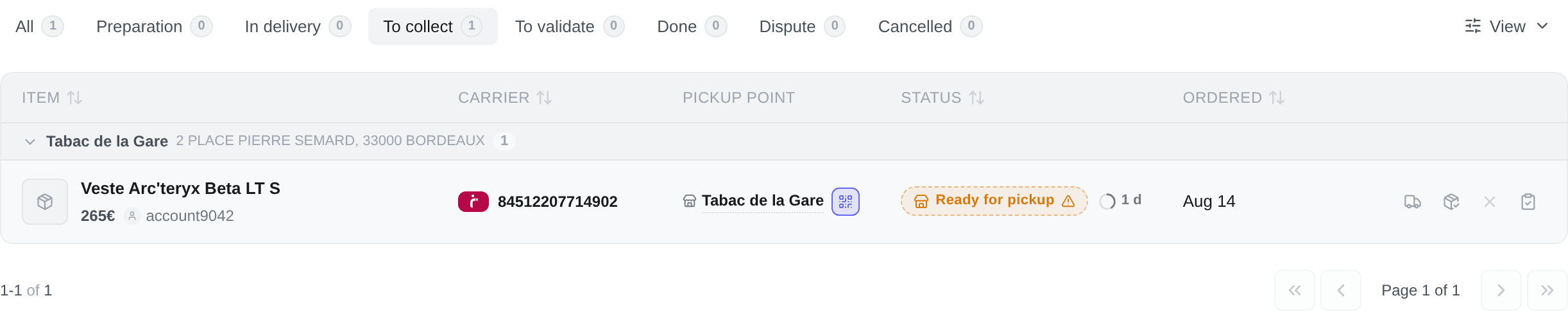
The Actions column on /purchases — an icon strip on desktop, a bar at the bottom of the card on mobile.
The order never changes:
Track · Conversation · Pick-up code · Collected · Confirm receipt · Report a problem · Cancel · Verdict
That is deliberate. A button whose position depends on what a row looks like means twelve rows with twelve different layouts, and nothing to aim at. Buttons are added and removed by whether the action exists for that order — never re-sorted, and never promoted.
Two of those slots hold a pair of opposites, and the two never appear together, so acting swaps one glyph for another and moves nothing else on the row:
- Collected is Mark as collected or Not collected after all;
- Verdict is Close this order in Kops on a frozen row that has none, or Undo this on any row that already carries one.
It is drawn in the Pickup point cell instead, as a small chip beside the address it works at — because that is what it is a property of, and a credential is only legible next to the place it opens. The Actions column filters it out rather than drawing it twice.
The mobile card has no Pickup point cell, which is why its action bar keeps the button in the third slot. Everything else on this page is identical on both.
Track shipment
Opens Shipping journey: the carrier, the tracking number with a copy button, the pick-up point, and every tracking event with its own date — Label created, Shipped, In transit, Arrived at sort facility, Out for delivery, Ready for pickup, Delivered. Track at the bottom hands you off to the carrier's own site.
It stays on the row for the whole of an order's life and goes away only once the order has ended without a parcel — cancelled, refunded, or a payment that failed. There is no journey to draw for any of those.
Before a label exists there is no journey to show, so the button is greyed rather than removed, with no tracking yet, the parcel has not been shipped to say why. It starts working the day the seller prints the label — the same button, in the same place.
Open the conversation
Opens the Vinted conversation for this order in the Kops Inbox. A dot on the icon means there is an unread message.
Pick-up code
The QR or the code that gets the parcel out — covered in full in Pick-up points and codes. The label tells you which of the two you will get before you press it.
On a desktop this is the chip in the Pickup point cell, not a button in this column. See above.
Mark as collected
A note on your own row saying the parcel is in your hands, ahead of Vinted noticing. See Marking a parcel as collected.
Confirm receipt
A real write to Vinted, and it cannot be undone. It completes the transaction, releases the payment to the seller and closes the window to report a problem.
Offered on a Delivered order only — the To validate tab's single status. Do not confuse it with Mark as collected, which sits right beside it and changes nothing at all on Vinted's side: one says I have the parcel, the other says and it is what I paid for.
After it, Vinted invites you to rate the seller. That happens in the conversation.
Report a problem
The other half of the same window: it opens a dispute, which suspends the order while Vinted reviews it. The whole flow — choosing the problem, the photos Vinted requires, the return, the refund estimate — is in Disputes.
Offered alongside Confirm receipt, on a delivered order.
Cancel the order
Sends a cancellation request to Vinted — and a request is what it stays until somebody answers it. Which of two things happens depends on where the parcel is:
- Before the seller has a label, Vinted cancels the order itself. Four out of five cancellations end here, within a second — the row follows within a minute or so, once Vinted's order catches up.
- While the label is being made, Vinted takes the request without showing it to anyone, and sometimes applies it on its own within a few minutes. If it has not after five, the request reached nobody: the badge goes and the button comes back.
- Once a label exists, Vinted puts the request to the seller, who may accept or refuse. The order stays live the whole time: it can still ship, arrive and be collected.
While a request is standing the row shows Cancellation requested — the only badge a cancellation draws — and the button becomes Check again — a second request would add nothing, even though Vinted goes on offering the cancellation the whole time the seller decides. Kops does not watch Vinted in the background: an acceptance, or a parcel that leaves anyway, reaches the row with the order's next update, but a seller's refusal shows only in the order's conversation on Vinted, which Kops reads when you look — so looking is how you find out: pressing Check again — on the row, or in the conversation's header — or opening the purchase's attempt window.
A request you made in Vinted's own app counts too: pressing Cancel finds it with the seller and shows it on the row, rather than asking them a second time.
The same Check again takes the button's place whenever Vinted is not offering the cancellation for now, or has not created the order yet — a 3-D Secure check still settling, for instance. Only a refusal that looking cannot change — the order cancelled, finished or shipped — takes the button away.
When Vinted stops holding your request, the button comes back the moment you look — a seller's refusal is one way that happens, a new label printed by the seller another. The badge goes and nothing takes its place: Vinted does not say why it stopped, so Kops never says Refused, and you can send another request as many times as Vinted allows — the end of one request is not the end of your right to ask. If the order has moved on since — shipped or finished — the button does not come back, and the status says where the order is.
Two endings are final. A parcel that leaves despite your request ends it: the badge goes and the status says the parcel is on its way — you have paid for it, so the next step is the problem report once it arrives. And once the order is cancelled, the status says so and the button stays away.
Offered whenever Vinted would take a request — including when nobody has asked Vinted recently, in which case the confirmation asks before anything is sent. The same control sits everywhere an order is named: the attempt windows, the item's menu in the feed and the inbox, and the conversation's header. It is the last of the buttons that write to Vinted, and on mobile the bar packs from the right, so the one target where a mis-tap costs something sits at the end of that run rather than floating.
Only the verdict slot can follow it. Recording a verdict withdraws Cancel — unless Vinted, asked moments ago, is still offering to cancel the order: what Vinted says outranks the verdict you recorded, and both then sit side by side.
The verdict slot
Two buttons share the last position, and neither touches Vinted.
Close this order in Kops appears only on a row whose account can no longer sync, and it is the one button that exists because the account is dead. It records what actually happened to an order Vinted will never answer for again. See When a status is frozen.
Undo this — show what Vinted last said replaces it once a verdict is recorded, and stays available even while the account is dead: the account can revive later, and a row stranded on a decision with no way back would be the worse failure. It is drawn as an arrow rather than a cross, because it is not a cancellation of anything at Vinted.
Why a button is greyed out
Two reasons, and the row tells you which.
| Message | What it means |
|---|---|
| no tracking yet, the parcel has not been shipped | The seller has not printed a label. Every other button on the row still works |
| unavailable, this Vinted account no longer responds | The account is banned, deactivated or disconnected. Every button that goes through its Vinted session is dead |
Grey rather than gone, both times. A button that disappears and comes back as a row moves through its life slides every other button sideways — and where did my button go is a worse question than why is this one grey.
Track is one exception on a frozen account: it keeps working, because the journey is drawn from what Kops already holds and needs no live session. The other two are the collected mark and the verdict slot — all three write to, or read from, Kops alone.
If a parcel has both a Vinted Go QR and a code from your forwarded mail, the code button stays pressable on a frozen account — the emailed half lives in Kops. The modal opens and reports the half it could not load.