Execution modes
One account per item or several at once, what happens after an eligible payment or temporary failure, the four separate pools that decide which accounts each kind of purchase may use, and how one folder can run more cautiously than the rest of your workspace.
Settings → Purchase Preferences → Execution. Everything on this page saves as you change it.
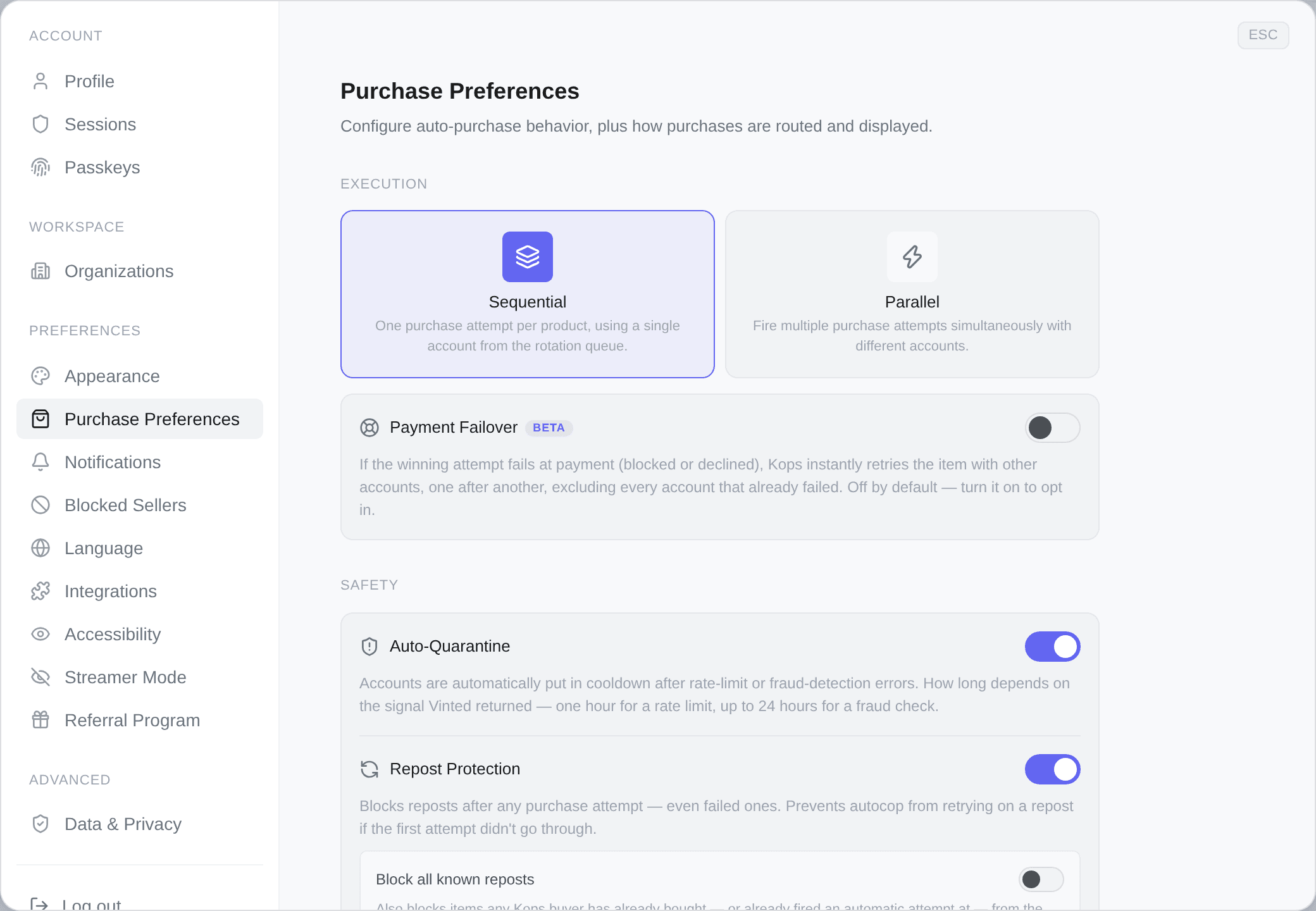
The two modes
Sequential
One purchase attempt per product, using a single account from the rotation queue.
The account chosen is the least recently used one that is eligible, and where two are equally idle, the one with fewer failures behind it. One attempt is fired. If it fails, Kops moves on unless Automatic Failover is enabled and the failure is eligible.
Rotation is fair by construction: each fire takes the next account in line, so no account carries the whole load over time.
Parallel
Several purchase attempts at once, with different accounts.
You set how many — between 1 and 10, default 2. The field only appears once you have picked this mode. If you have five eligible accounts and you set three, three of them race the same item and the first payment to complete wins it.
That is the whole argument for parallel, and it is not speed: each account is a separate ticket in the same race. Two accounts is roughly two chances at the item, not one attempt that runs faster.
Choosing between them
Sequential is right when
- you have one or two accounts,
- your filters are on low-competition items,
- you want the calmest possible footprint per account,
- you would rather lose an item than spend three accounts on it.
Parallel is right when
- you have several genuinely independent accounts,
- your filters are on items that sell within seconds,
- you have set a real ceiling, so a lost race costs you nothing,
- one account's failure should not decide the item.
Parallel needs accounts that do not look alike. Accounts Vinted can link to each other are not separate tickets — see Creating a Vinted account safely. Racing six linked accounts is worse than racing one clean one.
Automatic failover
A switch of its own, off by default, marked Beta, and it applies to both modes. A sequential attempt can also encounter an eligible failure.
Failover covers eligible payment failures (blocked, rejected, declined, generic error, or locked) and temporary errors (CAPTCHA, rate limit, server or network error, or pickup-point lookup). It does not retry an uncertain payment or an item known to be sold or removed. In parallel mode, Kops waits for the other attempts on that item to finish; if one succeeds, no retry is needed.
With the switch on, when no attempt succeeds, Kops retries the same item with another account, one after another up to the configured budget. Accounts that hit an eligible failure are excluded. A parallel attempt that only lost the race may be reused, with its existing transaction when possible; otherwise Kops selects a fresh account.
Turning the switch on reveals two things:
| Control | Range | What it does |
|---|---|---|
| Failover accounts | 0–10, seeded at 2 | How many accounts the retry chain may spend |
| Failover groups | any account groups | Which accounts it may spend them on. Only shown once the count is above zero |
Failover groups narrow the retry chain. Leave it empty and the retries obey whatever restriction the original purchase obeyed. Set it and only those groups retry — useful when you keep a couple of accounts specifically as a safety net.
The number is a budget, not a second switch, but a budget of zero buys nothing. Set it to 0 with the feature switched on and the hint under the field says so: Failover is off — eligible payment or temporary failures will not trigger another account. Set 1-10 to enable.
You will not land there by accident: turning the switch on with no budget seeds it at 2 precisely so that "on" works out of the box. It is reachable only by typing 0 yourself, which is a slower way of switching the feature off.
Failover retries appear on the Attempts page with a Failover retry badge, they can be filtered on alone, and each one names the attempt it is retrying.
The four account pools
Four different kinds of purchase can each be restricted to their own account groups, and they are separate on purpose: the accounts you want a bot rotating through are not always the accounts you want speaking to a seller under your name.
| Pool | Where | Restricts |
|---|---|---|
| Manual Purchase Groups | Manual purchases | Buying, starting a conversation or making an offer by hand |
| Failover groups | Execution → Automatic Failover | The retry chain above |
| Pre-order groups | Pre-orders | Pre-order purchases — see Pre-orders |
| Auto-offers | Auto-offers | Which accounts send automatic offers |
Every one of them means the same thing when empty: no restriction, the whole eligible pool. None of them can widen the pool — an account still has to be ready and in the seller's zone.
Autocop itself has no pool on this screen. Its restriction comes from the folder the filter lives in, through that folder's account group — see Account groups.
Quarantine on manual purchases sits in the same section as the first of them. It decides whether a failed manual purchase counts toward that account's cooldown, the same way an automatic one does — the same seven errors, the same tally, and the same three in a row for the fraud-detection pair. See What counts, and how many. On by default. It is subordinate to automatic quarantine: with that master switch off, nothing quarantines anything, from any source, and this row greys out and says so. How long the cooldown lasts is not set here: a fraud block's is the Fraud quarantine duration under Safety, the same for every source, and the other signals keep their own — see Quarantine.
Overriding it for one folder
A folder can run its own execution settings, so one niche can be cautious while the rest of the workspace is aggressive. Open the folder's menu and pick its autocop preferences.
The window first says where the folder's settings come from:
- Global settings — the folder follows the settings tab, and changes with it. The window shows what that gives the folder right now, read-only; you change it in the settings tab.
- Custom for this folder — the folder keeps values of its own, whatever the settings tab becomes.
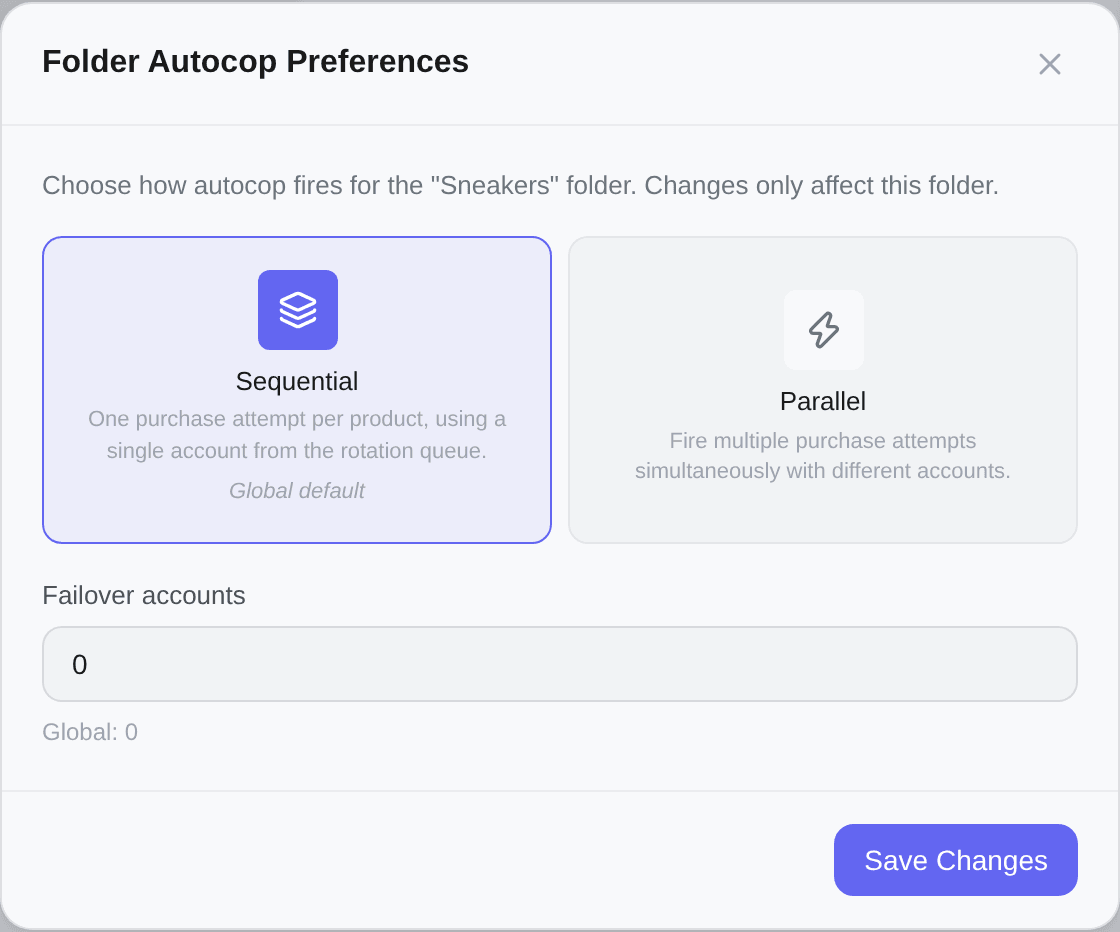
A custom folder sets exactly three things:
- the mode — sequential or parallel; the one the settings tab holds carries a Global default tag,
- the number of parallel accounts, which only appears once you pick parallel,
- the failover accounts count, in either mode, while failover is on.
Under each number field, Global: … gives the settings tab's value. Every value a custom folder shows is stored, one equal to the settings tab's included: a folder set to 2 parallel accounts stays at 2 when the settings tab moves to 4. Switching back to Global settings clears the folder's own values, and it follows the settings tab again.
Unlike the settings tab, this window does not save as you type: Save Changes lights up only once what you chose differs from what the folder has stored, and a count out of range keeps it off and says why.
A folder can set a failover count but cannot switch failover on. That switch is workspace-wide. While it is off, a custom folder has no count to set: one it stored before is kept, and a folder that stored none takes the settings tab's count once failover is on.
A folder customised by an earlier version of this window may still leave some values to the settings tab — that version stored only the values that differed from it. Such a folder opens on Custom for this folder with a note saying so, and Save Changes already lit: saving keeps every value it shows.
Global autocop and automatic quarantine — its duration included — are not overridable per folder.
The first because the folder already has its own on/off switch, and a second master switch inside a subordinate scope is how an emergency stop stops being one. The second because quarantine is about account health, which is workspace-wide — a folder that could disable it would be disabling it for accounts it shares with every other folder.
The two repost settings and the four account pools are workspace-wide for the same reason: the repost guard is about a seller and a listing, not about which folder happened to match first, and a pool is about which accounts may act at all.
Both modes obey the same limits
Whichever mode you run, an attempt still needs an account that is ready, in the seller's zone, and inside whatever group applies to that kind of purchase. Parallel with three accounts and only one of them eligible is sequential with extra steps.
The rest of this screen belongs to other pages: Safety (quarantine and repost protection) is covered in Autocop, and the Preferences block at the bottom — which account the inbox picks for you, how much of a running purchase you want to watch, and the four messages to sellers — is not about execution at all.
See Cop Faster for which of these levers is actually worth your afternoon.