Shop orders
Every order the workspace placed in the Shop, and each order's page — its number, its warranty's end, the accounts it delivered and the one status each of them is in, from Active to Credited.
Orders, the Shop's second tab — /shop/orders, titled Shop orders. Its subtitle, which a phone hides, reads Credentials and warranty are on each order.
These are your purchases in the Shop. The parcels your accounts buy on Vinted are on the Purchases page, which is another thing entirely.
The orders list
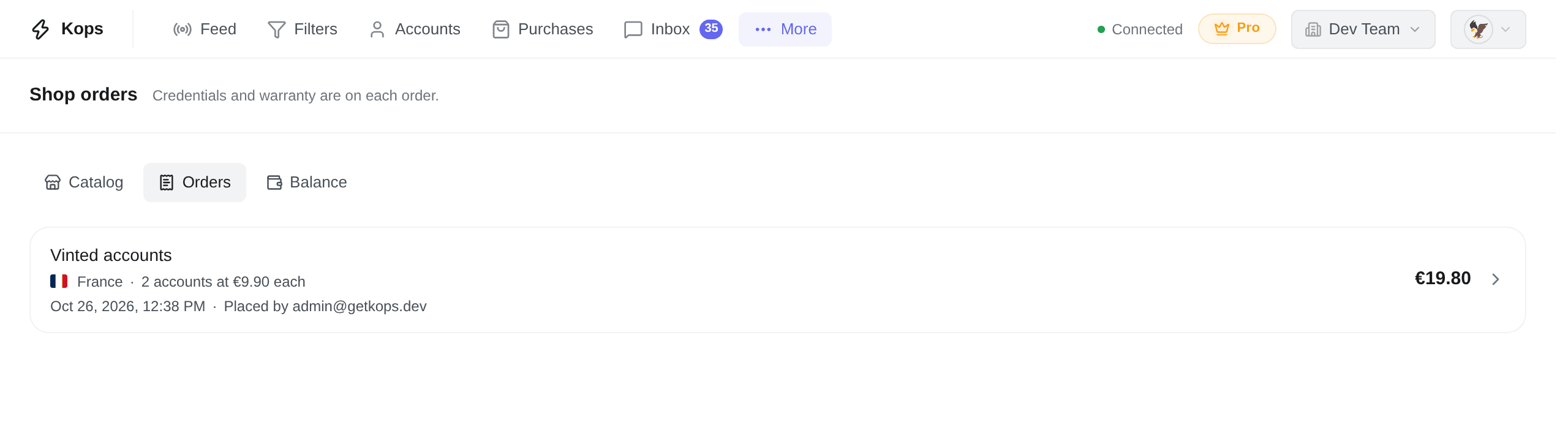
Newest first. Each row is one order, and the whole row opens its page:
| On a row | What it says |
|---|---|
| The product's name | What was bought |
| The country, then {count} accounts at {price} each | How many, and at what unit price — 1 account at {price} for one |
| The date, then Placed by {email} | When, and which Admin placed it — Placed by a member since deleted once that person is gone |
| The amount, on the right | What the order cost |
Show older orders reads further back. With nothing bought yet, the page says No order yet — Accounts you buy show here, with their credentials and warranty. — and Browse the catalog leads to the products.
In Streamer Mode, the quantity line, the Admin's email and the amounts are masked.
The order page
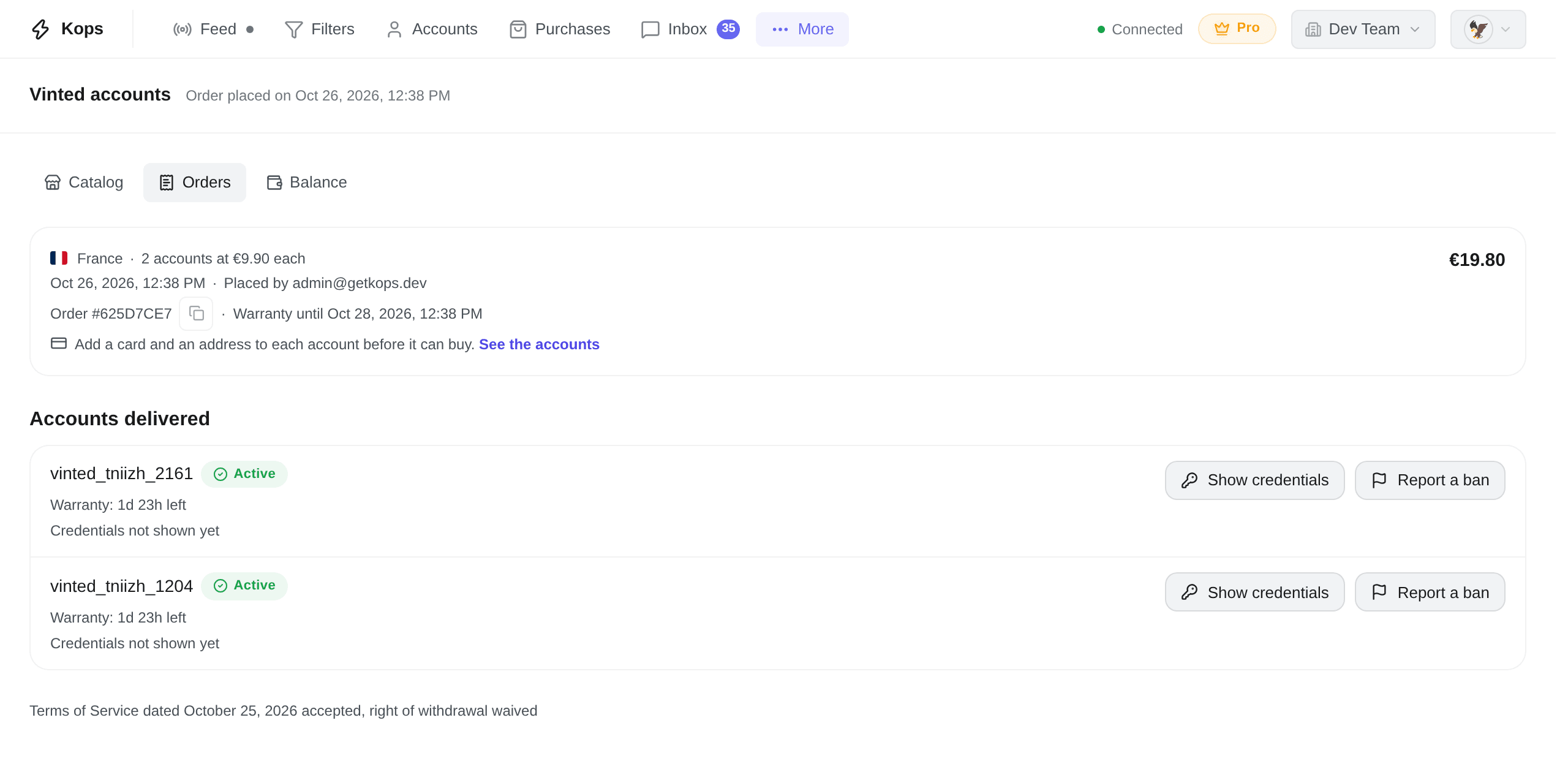
Titled with the product's name, with Order placed on {date} beside the title (hidden on a phone). The purchase dialog opens this page once the order is placed, and the order's email, the Balance tab's moves and every bought account's Shop mark lead here.
The summary
The card at the top holds the order in four lines, with its total on the right:
- the country, then the quantity and the unit price — {count} accounts at {price} each;
- the date, then who placed it — Placed by {email};
- Order # followed by eight characters, the short form of the order's number, then Warranty until {date}, 48 hours after the order — Warranty ended on {date} once it has passed. The copy button beside the number, Copy the full order number, copies the whole number: that is the one to give support. A replacement carries its own warranty, on its own row;
- Add a card and an address to each account before it can buy., with See the accounts, which opens your Accounts.
At the bottom of the page: Terms of Service dated {date} accepted, right of withdrawal waived — the version of the Terms the order was placed under, and the waiver its box gave.
The accounts delivered
Accounts delivered lists them one per row, the last delivered first. An account given under the warranty is delivered on the order of the account it replaces, so a replacement is always found on the same order's page as the account it stands in for. Past fifty accounts, Show older accounts reads the rest.
A link to one account, such as the Shop mark on Accounts, scrolls straight to its row and tints it for a few seconds — on an order of more than fifty accounts, only for the fifty delivered last.
An address that is not one of the workspace's orders shows Order Not Found, with Back to the orders.
Each account's status
Every account says one status, in its badge, and the line under it says what it means for you:
| Status | What happened | The line under it |
|---|---|---|
| Active | Kops holds it, signed in, with no ban recorded | Warranty: {time} left while it runs. After a report Vinted answered as working: Checked {date}: Vinted says it works |
| Banned | Vinted banned it, and no claim is open on it | While the warranty runs: Its warranty claim opens on its own within minutes. |
| Deactivated | It went inactive in Kops with no ban recorded — its session ended, after a password change for instance | Warranty: {time} left while it runs. Reconnect it, so it can be checked: see Keep it in Kops and signed in |
| Removed | Someone removed it from Kops | None: it is no longer checked |
| No longer in Kops | Kops does not hold the account any more | Said as the row's heading, with no badge |
| Waiting for support | A ban was recorded, and support decides | Banned {date}. Support reviews it; the decision will show here. |
| Replaced | Banned under its warranty, and replaced free of charge | Replaced by {username} · {date}. The name jumps to the new account's row |
| Credited | Banned under its warranty, and its price credited | Banned {date} · {amount} credited to your balance · See the balance |
A replacement's row adds Replacement for {username}, the account it stands in for.
A claim support refused is said under whatever status the row then has: Support refused its claim on {date}. The row shows no warranty after it.
What each of those outcomes means, and when a ban is replaced rather than credited, is in Credentials and the warranty.
Under each account
The warranty, on an Active, Banned or Deactivated account:
| Line | When |
|---|---|
| Warranty: {time} left | While its 48 hours run |
| Warranty ended on {date} | Once they have passed, followed by Kops's last check on it |
| Kops is checking it. | Just after the end, until that check has an answer |
| Vinted said it worked as its warranty ended. | The check found it working |
| Its session had ended, so Kops could not check it as its warranty ended. | Kops was signed out of it |
| It was no longer in Kops as its warranty ended. | It had been removed |
| Kops could not check it as its warranty ended. | The check got no answer |
The credentials, on every account: Credentials not shown yet, then Credentials shown once, by {email} on {date} or Credentials shown {count} times, last by {email} on {date}. When support displayed them last, the line says by support instead of an email.
The buttons: Show credentials, on every row, and Report a ban while the warranty runs and the account can be reported. Both are in Credentials and the warranty.