The Attempts page
Your logbook — every purchase Kops tried, won or lost, with what it cost and why it ended that way. The six columns, the five filters, and what the detail panel is actually for.
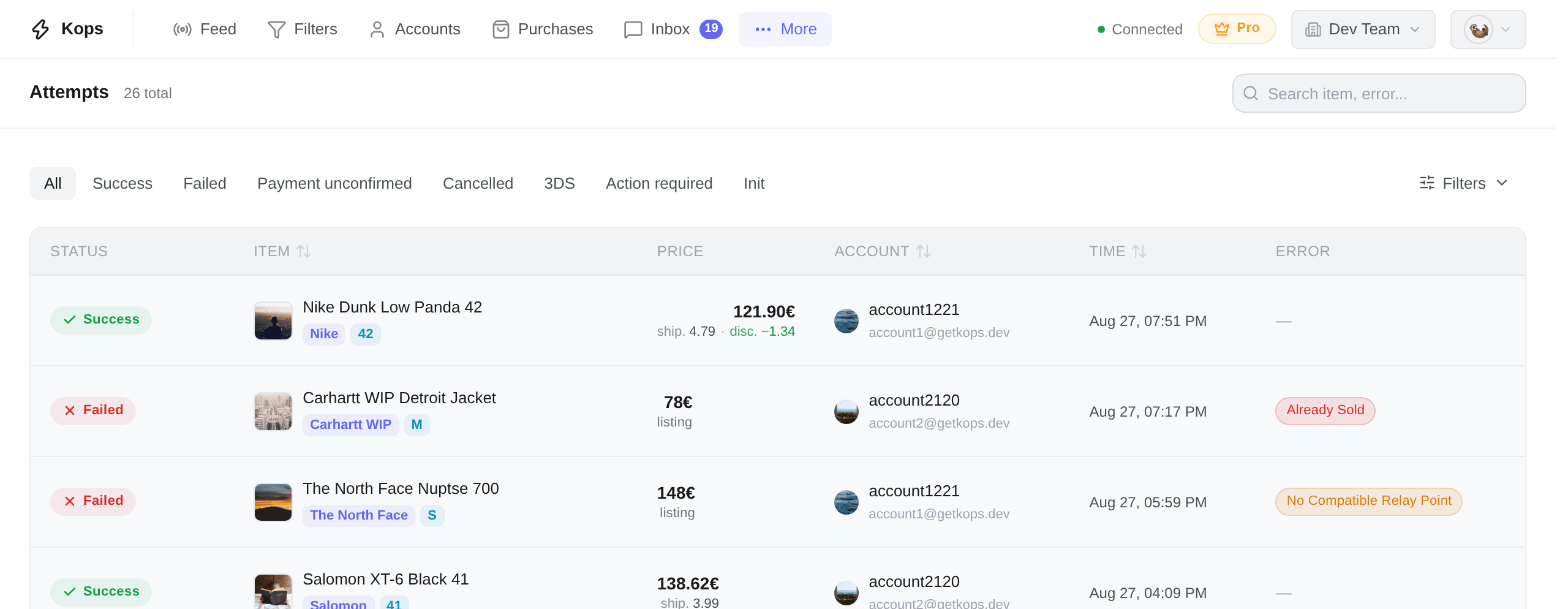
/attempts. Every purchase attempt made from this workspace, newest first.
What an attempt is
One recorded try at buying one item: when it started, which account, what it would have cost, and how it ended.
The important part is that attempts exist for the ones you lost. A page that only listed your wins would tell you nothing about why you are not winning more — the losses are the diagnostic.
There is no Refresh button, on purpose. The list is live: an attempt that starts, changes status or fails appears and updates under you, and a freshly changed row is briefly highlighted.
The columns
| Column | What it holds |
|---|---|
| Status | How the attempt ended |
| Item | Photo, title, brand, size — and a {count} items badge when it was a bundle |
| Price | The total charged, with the fees worth scanning for underneath |
| Account | Which of your Vinted accounts ran it, with its email |
| Time | When it started |
| Error | A coloured pill when it failed — hover for the reason and what to do |
There is no duration column, on purpose: how long a purchase took says nothing about whether it succeeded. A 12-second win is still a win. The per-step timings live in the detail panel, where they can be read in context.
Sorting and column choice are not offered either. The list is always newest-first, and every column here is either the attempt's identity or a fact the row is read for.
The headline is the total actually charged, not the listing price. Under it, on the same cell, sits a short breakdown — but only of the two lines a reseller scans for: shipping and any discount. Buyer protection is already inside the headline, and repeating it would push the useful numbers off the row. A third line collapses into a +1.
The full receipt — item, shipping, protection fee, discounts, extras — is one click away in the detail panel.
On some attempts the exact charged amount was never available, because the checkout failed before Vinted priced it. Those fall back to the listing price and carry a listing tag, so you can tell an estimate from a fact.
The statuses
The tabs above the table are All plus these:
| Status | What it means |
|---|---|
| Success | Bought. The order is on the Purchases page |
| Failed | It did not go through — the Error column says why |
| Payment unconfirmed | A bank verification was opened and the purchase never settled |
| 3DS | A 3-D Secure verification is open right now and waiting on you |
| Action required | Vinted wants a manual step (re-entering your card's CVV, typically) before it will take the payment |
| Cancelled | The attempt was cancelled |
| Init | Still starting. Attempts pass through this in well under a second — one that is stuck here is an orphan |
Payment declined is not a tab. It is the label a Payment unconfirmed row wears once the bank has actually answered — and the answer was no. The two share one status because they are one state, split only by whether an answer ever arrived: declined means we know it failed; unconfirmed means the window closed in silence, and that is the one worth checking on Vinted before you retry.
A 3DS chip can also appear beside a settled status. It is not a status of its own: it records that the purchase went through a bank challenge, and a challenge can end in a success just as easily as in a failure.
Filtering
The Filters button opens a panel with five, and they combine:
| Filter | Choices |
|---|---|
| Accounts | Any of your buying accounts, searchable, several at once |
| Error type | One of eleven categories — see Attempt errors |
| Source | Manual, Autocop, or API |
| Failover | Show only automatic failover retries |
| Date range | From and to, in your own timezone |
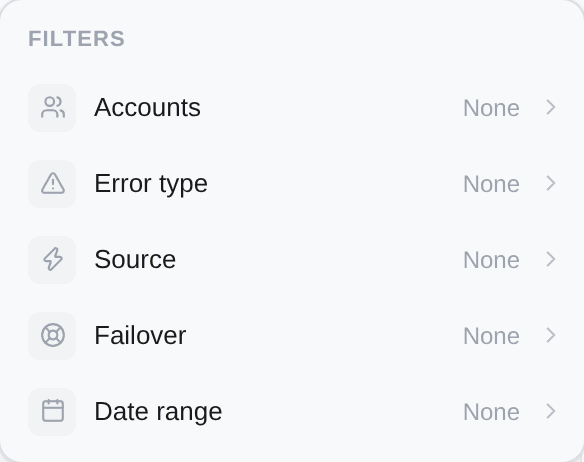
Only Accounts takes several values at once. Error type, Source and Failover take one each — pick a second and it replaces the first. The status tabs are separate, above the table, and the search box matches the item title or the error.
The detail panel
Click any row.
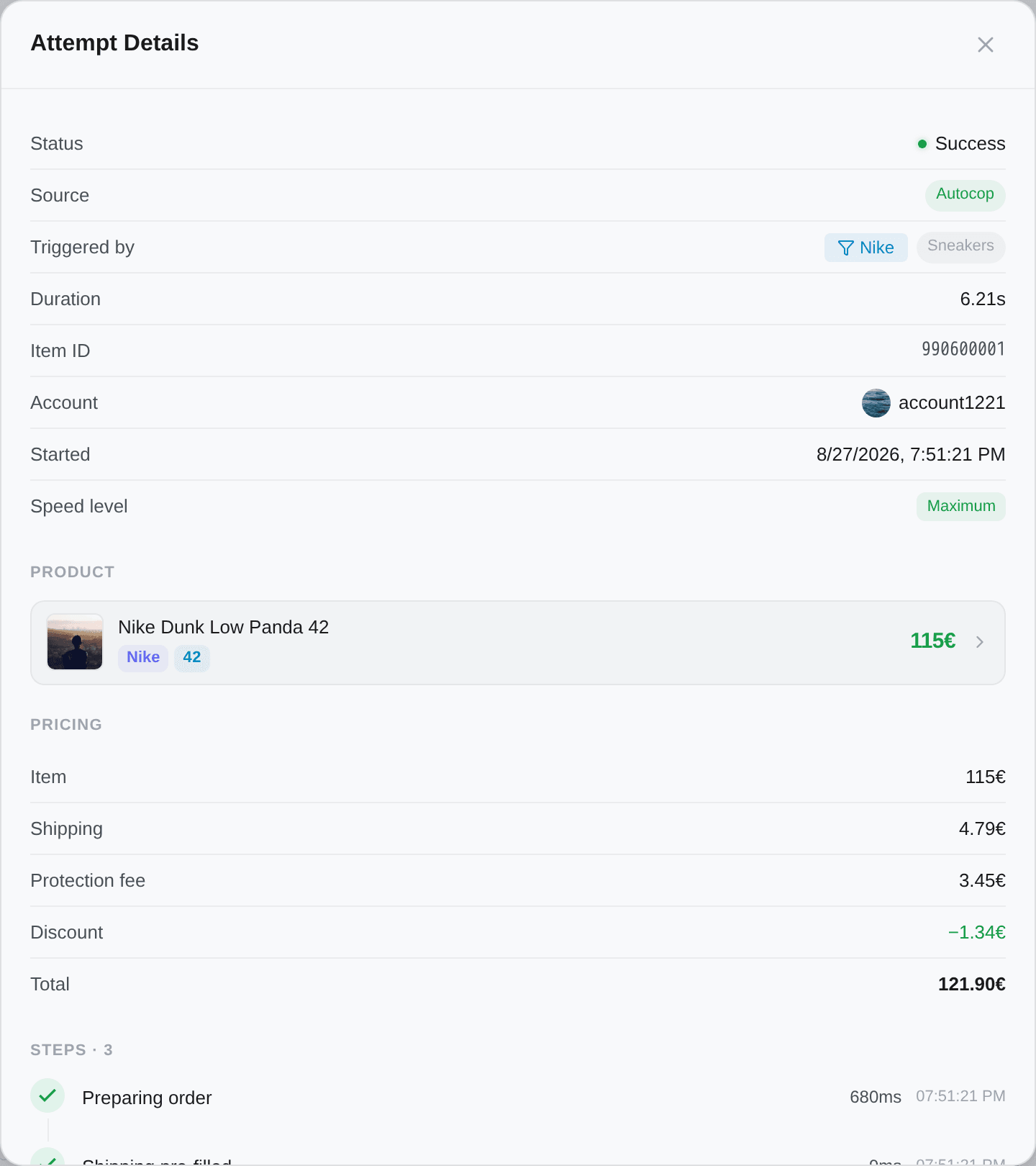
The top half is the facts, in this order: Status · Source (Manual / Autocop / API, plus a Failover retry badge when it is one) · Triggered by · Retry of attempt · Duration · Item ID · Account · Started · Speed level · Verification taken.
Triggered by is the filter that fired the purchase, with its folder beside it — not a person. It is frozen at fire time, so it stays right after the filter is renamed, moved or deleted, and clicking it opens that filter. A manual buy of an item no filter matched has no such row.
Speed level is the one to look at when you keep losing races. Maximum means the shipping step cost nothing — the relay point was already known. Delivery not pre-filled means the purchase had to stop and look one up, and that detour is where a race is usually lost. Address and shipping explains how to remove it. It only appears on attempts that reached the payment step: one that failed earlier never got far enough for the question to mean anything.
Verification taken appears when the purchase included one of Vinted's paid authenticity checks, and names it with its price.
Then the product (one row per item, so a bundle shows all of them), the full price breakdown, and the transaction: the payment outcome, the shipping method and the carrier. On an attempt that went through a bank challenge, the payment row reads the outcome plainly — Confirmed — the payment went through, Declined by the bank, or No response — the payment was never confirmed.
Below that, Steps: the timeline, one row per stage, with how long each took. Expand a step for the raw exchange with Vinted — useful to attach when you contact support, and hidden entirely in Streamer Mode. The panel ends with the Attempt ID and, when there is one, the Transaction ID, both one click to copy.
Because the wait belongs to your bank, not to Kops.
Once the payment is submitted, Vinted hands the charge to your card issuer, which authorises the amount, checks the funds, and can add a 3-D Secure verification. That round trip goes through the banking network and routinely takes several seconds — longer when your issuer is slow.
A high number on that step is normal and is not a sign anything went wrong. It is the only step on the timeline whose duration is out of our hands.
Attempts are not orders
An attempt records a try. An order records a purchase that completed.
Every successful attempt has an order behind it; most attempts do not have one. If you want to know where a parcel is, you want The Purchases page. If you want to know why you did not get one, you want this page.