Pausing and cancelling
Stopping without losing anything — how a pause is scheduled rather than immediate, what actually stops while it runs, what restarting costs, and how to cancel — from Kops, in every case.
Workspace settings → Subscription. Admins only.
Pause, in one paragraph
A pause does not start today. This month is already paid for, so nothing stops until your paid period ends. The pause begins the day after, runs for the length you chose, and then your subscription restarts on its own.
You are not billed for the paused months.
Choosing a length
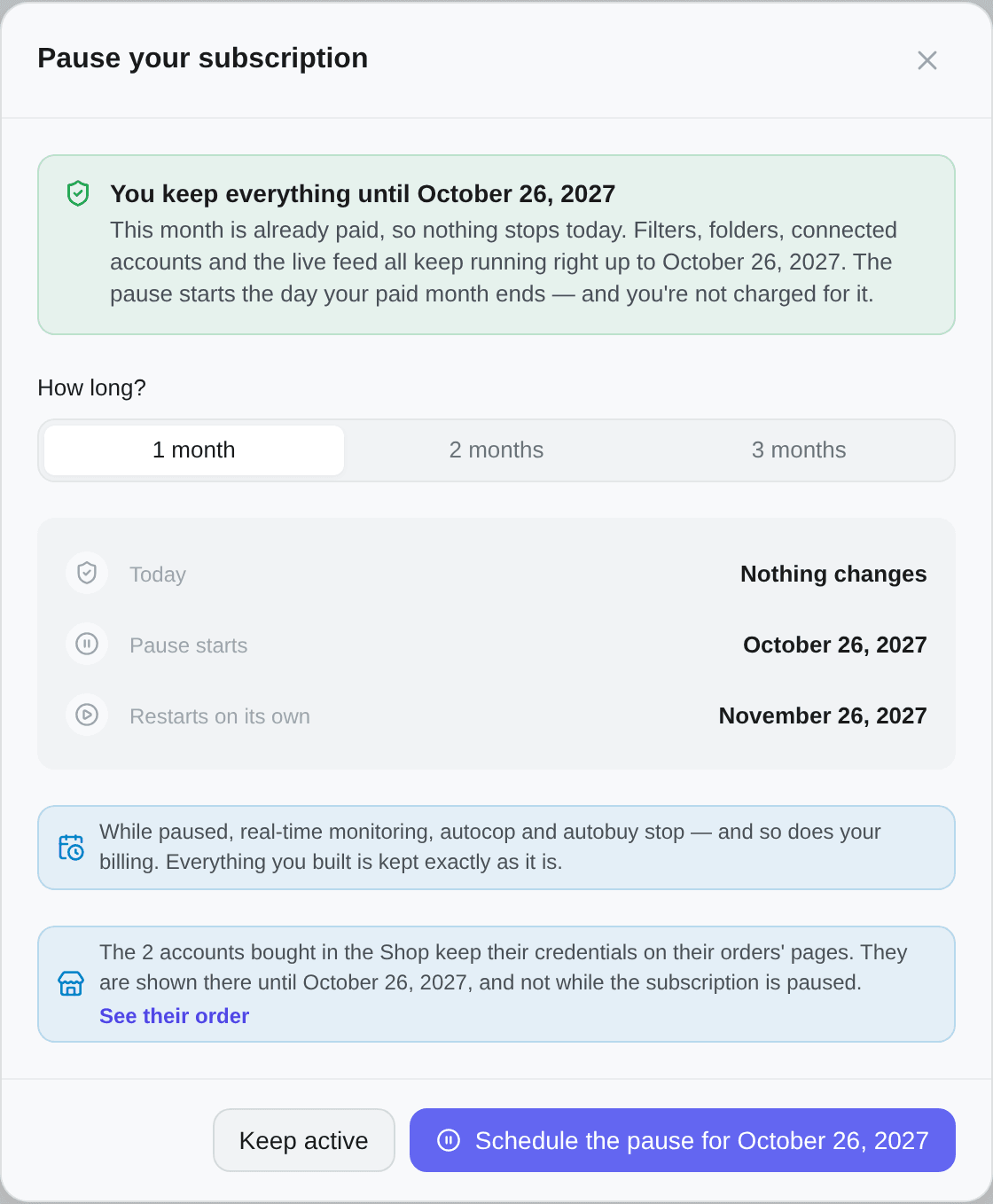
1 month, 2 months or 3 months. The dialog shows the whole timeline before you confirm:
| Today | Nothing changes |
| Pause starts | The date your paid period ends |
| Restarts on its own | One, two or three months after that |
The confirm button names the date: Schedule the pause for {date}.
What keeps running until it starts
Everything. Filters, folders, connected accounts, the live feed, autocop — all of it runs right up to the pause date. That is the month you already paid for, and the dialog says so under You keep everything until {date}.
While a pause is merely booked, a banner sits at the top of the tab with Cancel the pause beside it, and the plan grid disappears: a booked pause cannot change plan, so the section is hidden rather than offered and then refused.
What stops while it runs
Real-time monitoring, autocop and auto-buy stop. So does your billing.
Nothing is deleted. Your filters, folders, criteria and connected Vinted accounts stay exactly as they are — the accounts stay connected, which is what makes restarting instant rather than a re-setup.
The Shop closes for the pause. Its balance is kept, but it can be neither topped up nor spent, and the credentials of the accounts you bought are not shown until the subscription runs again. The pause dialog says so in a note under its dates — They are shown there until {date}, and not while the subscription is paused. A warranty still running keeps running, but no Admin can report a ban during the pause: a ban Kops finds itself is decided by support. See The Shop.
On a team, your members lose access while you are paused. The dialog warns you. They see This workspace is paused and a note that only the owner can restart it.
Cancelling the pause, or restarting early
Two different things, and they cost different amounts.
Before the pause has started — Cancel the pause, free, and everything carries on as though you never scheduled it. Restarting at this point also costs nothing: Your pause has not started yet, so restarting costs nothing.
Once it has started — Restart now bills a fresh period today and begins a new one immediately.
Two things the restart dialog tells you, and both matter:
- Your billing date moves. From then on you renew on that day of each month, not your old date.
- The amount shown is the plan only. Add-ons ride the same invoice, so the figure is labelled Charged today (from) — see Account packs and seats.
Or do nothing: it restarts by itself on the scheduled date.
When pausing is not offered
The button is always there, and always says why it is disabled — hiding it was the old behaviour, and it left annual subscribers with no way to learn the feature existed.
| What the tooltip says | Why |
|---|---|
| Pausing is monthly-only | A pause starts when your paid period ends, and on annual billing that can be months away. Switch to monthly to unlock it |
| You already have a pause scheduled | One at a time — and this covers a pause that is booked as well as one that is running |
| You have a plan change scheduled | Cancel it first, then pause |
| Your subscription is already ending | Undo the cancellation first if you would rather pause |
| Gifted and partner-key plans have no billing to pause | There is nothing to stop charging |
| Only an active, billing subscription can be paused | Including a trial — it is not billing yet |
| You need an active subscription to pause | There is no subscription at all on this workspace |
The reason comes from the server, not from a guess in the browser, so a disabled button and a refused request can never tell you different stories.
Cancelling
End subscription, on this page. The same button is on the pause screen and on the payment-failed one: you can cancel whatever state your subscription is in. The window says what will happen before you confirm, and asks why you are leaving — that part is optional.
| Your situation | What happens |
|---|---|
| Everything is paid — active, trial, pause booked | The subscription ends at the end of the current period. Nothing changes until then, and you are not charged again |
| An invoice is unpaid | The subscription ends now and the unpaid invoice is cancelled: you owe nothing |
| The pause is running | The subscription ends now: the month the pause covers was never charged |
Once the subscription has ended, the Shop closes the same way as for a pause: the balance is kept, but neither topped up nor spent, and the credentials of the accounts you bought are shown only once the workspace subscribes again. The cancel window says until when — They are shown there until {date}; after that, only once the workspace subscribes again.
Once the end is booked, the plan card carries a Canceling badge with Your data is saved. Resume before {date} to restore everything. Undo Cancellation, on this page, reverses it at any point before that date.
Manage Payment opens the Stripe billing portal: your invoices and your card. Cancelling happens here.
Pause or cancel?
| Pause | Cancel | |
|---|---|---|
| Where | This page | This page, the pause screen or the payment-failed one |
| Billing | Stops for 1–3 months | Stops at period end — now if an invoice is unpaid, which is cancelled |
| Restart | Automatic, on a known date | Manual, whenever |
| Filters and accounts | Kept | Kept |
| The Shop | Closed while paused: balance kept, no credentials shown | Closed once it ends: balance kept, no credentials shown |
| Team access | Suspended while paused | Ends |
| Best for | A slow season you will come back from | Leaving, with the option to change your mind |
Neither one deletes anything. If what you want is genuinely to erase the workspace, that is Delete organization — and it is not reversible.
Free days after an outage
If Kops was unavailable for a stretch, you may see an offer of free days on your subscription. Add my free days claims them; they apply at the end of the period you have already paid for, and your next renewal moves with them.
You are not charged for them, and claiming does not change anything else about your plan.